
Quiz marketing: How it works and how it helps to get more leads
A visitor comes to your store from an ad, opens the catalog, and sees 200 products. They filter by price, open four items, and leave without buying. The visitor just had no way to tell which option was right for them, and the page offered no help with that choice. That’s where most funnels lose people.
Quiz marketing closes that gap. Instead of a form that asks for an email and gives nothing back, you ask a few questions, and the answers decide what the visitor sees next: a shortlist, an estimate, a plan. This guide covers what quiz marketing is, which quiz type fits which goal, how to build one step by step, and when a quiz is the wrong tool, because yes, that happens too.
What is quiz marketing?
👉 Quiz marketing is a lead generation method where a short interactive questionnaire takes the place of a static form. A visitor answers a few questions and gets a personalized result: a recommendation, a price estimate, a shortlist, a plan. The business gets a contact along with the answers that produced it.
That combination is what separates a marketing quiz from the two formats it gets confused with.
| Format | What the person gets | What the business gets |
| Trivia test | A score: right and wrong answers | Engagement, rarely a contact |
| Survey | Usually nothing in return | Data, but no personalization for the respondent |
| Marketing quiz | A personalized, useful result | A contact plus the context behind it |
In practice that’s five to seven questions and about a minute of the visitor’s time. The payoff for the business comes later: by the time a salesperson picks up the phone, they already know the budget, the timeline, and what the person is trying to solve.
💡 A quiz is not the whole funnel, and it doesn’t have to replace your website. It’s the interactive step between traffic and the next business action: the point where a visitor stops browsing and starts deciding.
How quiz marketing works
A quiz moves a potential customer through a structured sequence that feels like a conversation instead of a form. Marketers usually call that sequence the quiz funnel. Each stage has one job, and when one of them fails, the stages after it never happen.
The quiz marketing funnel
The quiz funnel goes beyond the quiz itself. It starts with the click that brings someone in and ends with what your team does once the contact is in the CRM. It usually looks like this:
Traffic → Start → Questions → Personalized result → Lead → Follow-up
Here’s how those stages play out for an online skincare brand running a quiz called “Find Your Perfect Skincare Routine.”
1. Attraction. The user sees the ad and clicks because the question feels like theirs. It promises clarity: we’ll help you figure this out.
2. Engagement. They answer a few short questions: skin type, main concern, budget, current routine. The first one is easy and visual, so starting costs them nothing.
3. Personalization. Answers change the path. Oily skin on a tight budget leads to a different set of follow-up questions than dryness with room to invest. This is the point where a quiz stops resembling a survey.
4. Lead capture. The contact form appears before or after the result. Which placement works better depends on your goal, and we break down the trade-off in Step 8 of the “How to create a marketing quiz” section.
5. Result. The page shows two or three products matched to the answers, with one line explaining why each was picked. A first-time buyer sees a starter set. A returning customer with a bigger budget sees a targeted treatment for their specific concern.
6. Follow-up or sale. Some visitors buy straight from the result page. For the rest, you now know skin type, budget, and concern. That goes into the CRM and shapes every email, ad, and call that follows.
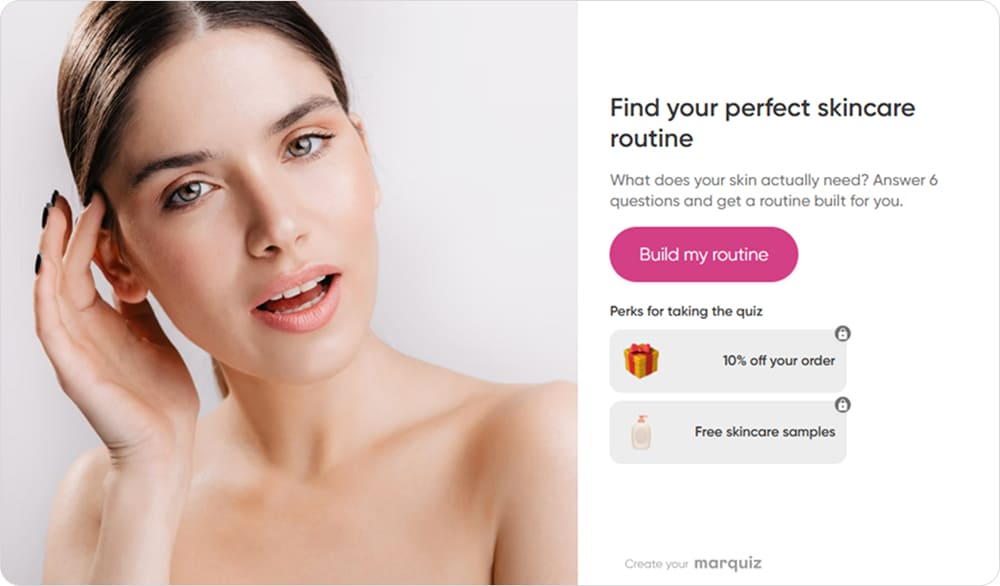
The start page offers a solution rather than a form, and that’s what makes people click
What can you use quiz marketing for?
Before choosing a quiz type or writing questions, name the job you’re hiring the quiz to do. Each job is a slightly different exchange: something useful for the visitor, and something specific for the business.
🔸 Generate leads. The visitor gets a calculation, a recommendation, or another result worth a minute of their time. You get a contact with context attached instead of a bare email address.
🔸 Qualify leads. With information about budget, scope, and deadline your team can prioritize whom to contact first.
🔸 Recommend products or services. Instead of sending someone into the full catalog, you show them three options that match what they told you.
🔸 Calculate price or scope. Especially useful in services, real estate, renovation, and manufacturing, where the price genuinely depends on parameters and a fixed number on the site would be misleading.
🔸 Segment audiences. Answers split people by need, readiness to buy, or experience level. The segmentation happens at the moment of contact, not weeks later in a spreadsheet.
🔸 Collect customer insights. Answers accumulate into a picture of what your audience actually needs. If six in ten pick the lowest budget tier, that’s a product signal worth noting.
🔸 Engage and educate. Knowledge tests, personality quizzes, and light game mechanics work at the top of the funnel, where the goal is attention and reach rather than an immediate contact.
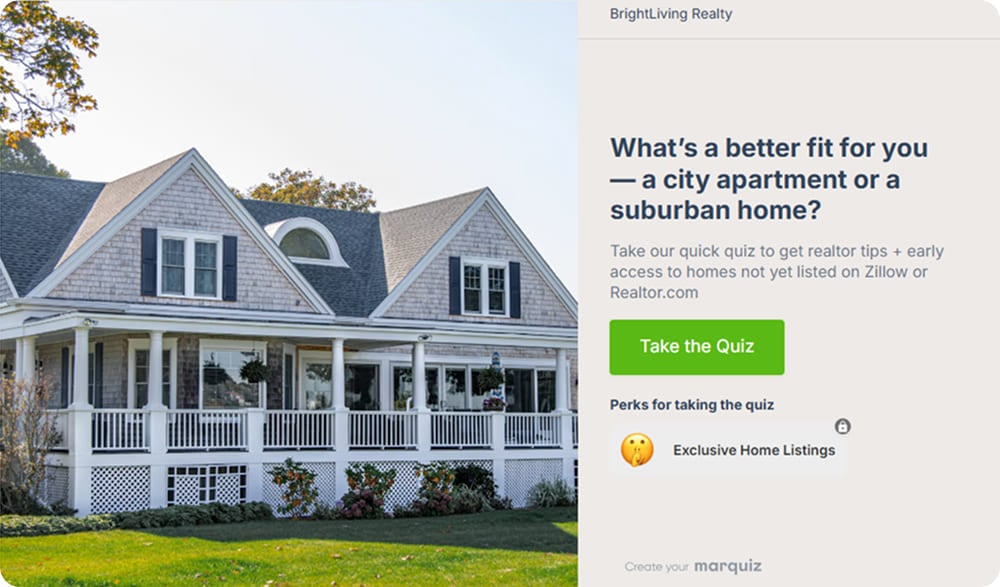
One quiz doing three jobs at once: segmenting buyers, qualifying them, and collecting the contact
Types of marketing quizzes and when to use each
Most classifications sort quizzes by genre: trivia, personality, assessment. That’s useful for writers and useless for marketers, because genre doesn’t tell you what the quiz is supposed to achieve. The list below sorts them by business task instead.
- Lead Generation Quiz. Fits services, B2B, education, and real estate, where the main goal is a contact and the result is the reason to leave it. Example: find out what your renovation will cost.
- Product Recommendation Quiz. Fits ecommerce, beauty, fashion, and SaaS with several plans. The result is a short list of products, often with a direct path to checkout. Example: build your skincare routine.
- Calculator Quiz. Fits any business where price depends on inputs. Unlike a lead generation quiz, the result is a number calculated from the answers, so every question has to map to a price factor. Example: estimate the cost of insurance, delivery, or a custom build.
- Qualification Quiz. Fits businesses where a wasted sales call has a real cost. The result for the user can be simple; the value is in the answers your team receives. Example: define budget, deadline, and project scope.
- Assessment or Diagnostic Quiz. Fits education, consulting, wellness, and SaaS. Telling users where they stand makes it a natural lead-in to a course or consultation. Example: check your English level or rate your marketing maturity.
- Personality or Entertainment Quiz. Fits social media and top-of-funnel campaigns. It trades qualification for reach, so don’t expect sales-ready leads from it. Example: which type are you?
- Survey or Research Quiz. Fits product teams and anyone planning a launch. The goal is first-party data rather than a lead, so keep the reward simple, such as a summary of what other respondents chose.
Here’s the short version, if you want to pick one and move on:
| Goal | Best quiz type | Example |
| Generate leads | Lead generation quiz | Get a renovation estimate |
| Increase sales | Product recommendation | Find your skincare routine |
| Qualify prospects | Qualification quiz | Find the right service package |
| Calculate price | Calculator | Estimate project cost |
| Segment audience | Diagnostic | Identify your marketing maturity |
| Increase engagement | Personality / trivia | Which type are you? |
| Learn about your customers | Survey / research quiz | Tell us what to launch next |
Why quiz marketing works
Interactivity by itself doesn’t convert anyone. A quiz works because it changes the way a visitor makes up their mind. Each point below names that mechanism, so you can see whether it applies to your business.
It reduces decision overload. A quiz turns one hard choice into a series of easy ones. Picking a skin type is simple. Picking a product from the whole catalog is not. By the end, the user has made five small decisions instead of avoiding one big one.
It gives people something in return. The result depends on what they answered, so the exchange feels fair.
It produces context-rich leads. A phone number arrives with a budget range, a timeline, and a stated problem attached. The contact becomes several times more useful.
It qualifies before sales gets involved. Questions about budget, scope, and deadline do the filtering that a first call usually does. People who aren’t seriously interested rarely finish a quiz, which is a feature and not a bug.
It creates data you can keep using. Quiz answers feed segmentation, email flows, lead scoring, and ad targeting long after the lead comes in. The visitor answers once, and you keep using those answers for months.
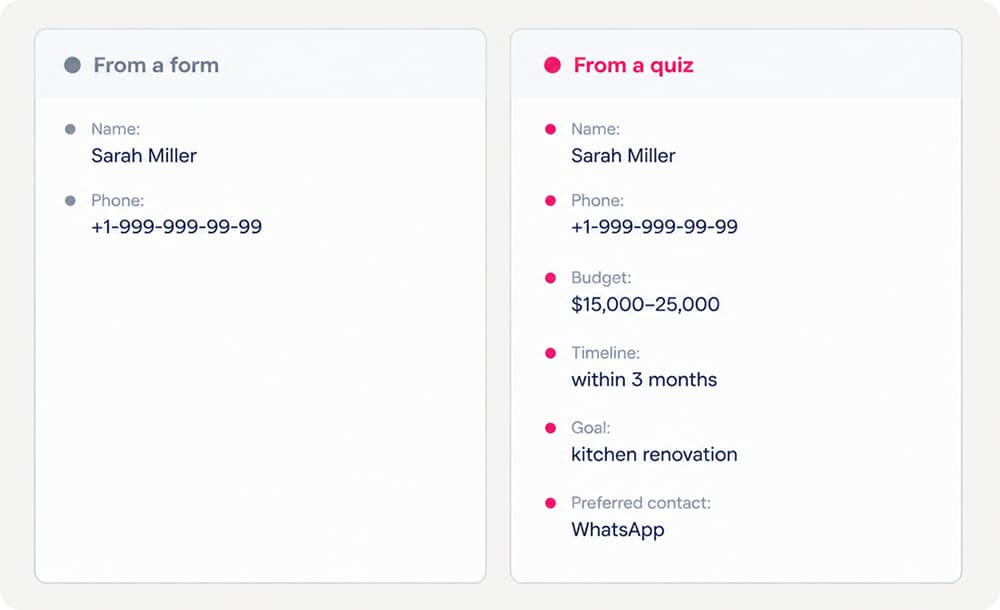
Your team opens the lead card and already knows who they’re calling
Real quiz marketing examples
The easiest way to see what quiz marketing does is to look at companies that already run it. Here are four examples from our own clients, in different niches: a service business, an online store, an EdTech school, and a real estate developer. Each one shows what wasn’t working before the quiz and what changed after it.
Lead generation: a hardware installation business
A local company that sells and installs cabinetry hardware was collecting requests through standard website forms. A name and a phone number came in, and everything else had to be uncovered on the call. They replaced the forms with quizzes that asked about the job first, so the qualifying happened before anyone picked up the phone.
📈 The result. Cost per lead dropped by 80%, conversion grew by 40%, and revenue doubled. Read the full case.
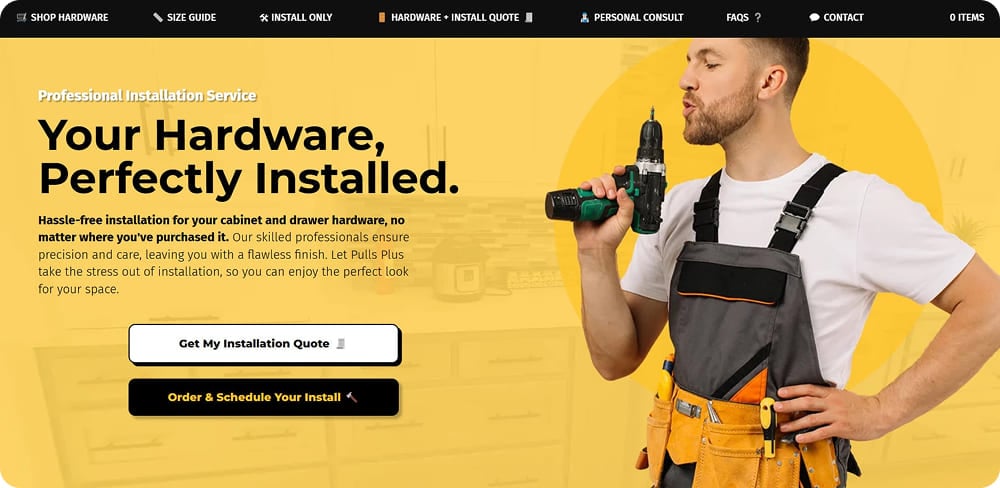
Instead of a request form, the site opens a quiz that asks about the job first
Ecommerce: an online activewear store
A brand that makes women’s activewear opened an online store and ran ads to it from search and social. More than a thousand visits came in and not a single order followed. Analytics showed the reason: shoppers were wary of ordering clothes they couldn’t try on. So the team replaced the size guide inside product cards with a quiz that asks for three measurements and returns the right size, and added a second quiz that appears when someone is about to leave, picks a collection for them, and raises the discount with every answer.
📈 The result. The store went from zero orders to three or four conversations a day, and the first sales came through those chats. Months later, with ads paused entirely, the team opened the dashboard and found more than 50 requests still waiting there. A quiz keeps collecting contacts from whatever traffic is left, long after the ad budget stops.
Education: an international EdTech school
Kodland teaches children to code and sells in more than 12 markets, each with its own language, audience, and offer. Rather than run one shared funnel and translate it, the team built hundreds of localized quiz funnels, adapting both the questions and the offer to each market.
📈 The result. More than a million leads collected through quizzes. Read the full case.
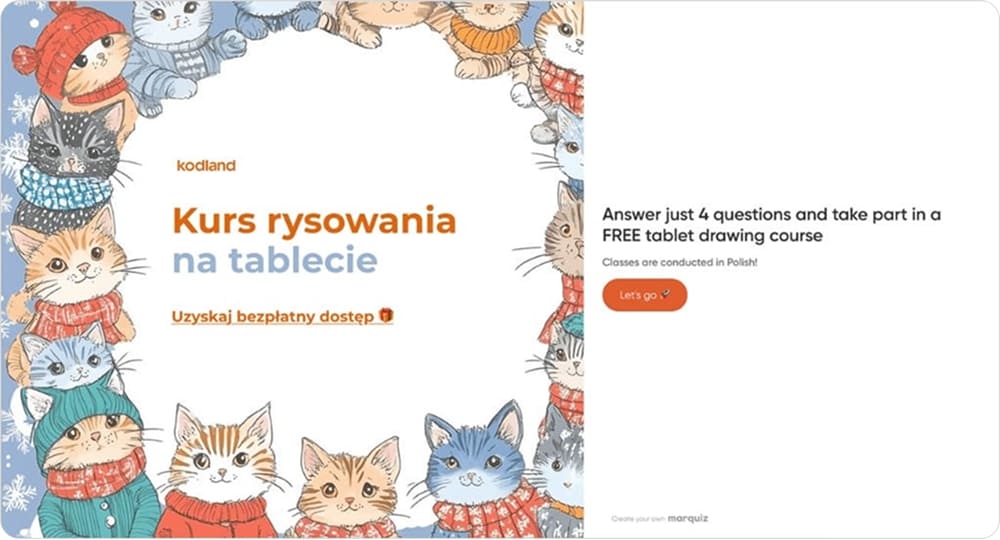
A tablet drawing course sounds fun to a child and looks like a digital skill to a parent
Real estate: fixing a quiz that wasn’t working
A developer launched a quiz for a new residential complex and got 0.18% conversion, far below what they expected. Built-in analytics showed that the problem wasn’t one thing but three: only 20% of the people who opened the quiz clicked “Start,” 30% dropped off at the budget question, and the contact form converted at 1%. So they rebuilt the start page, removed the budget question entirely, and let people leave a phone number or a WhatsApp contact instead of filling in a form.
📈 The result. Six weeks later, conversion had grown from 0.18% to 5%.
👉 A quiz that underperforms at launch isn’t a failed experiment. A weak number tells you something is broken, and analytics tell you where: here it was three separate leaks, each with its own fix. Plan for at least one round of this after you go live. And the work doesn’t stop at the lead either: another real estate team built a nurturing funnel on top of quiz answers and turned $8 leads into $2 million in sales.
How to create a marketing quiz
Assembling a quiz in a builder doesn’t take much time. Deciding what to ask and why takes longer and matters more, so the ten steps below are about the decisions. They start with the question most quizzes skip: why would anyone answer at all?
Step 1. Define the value for the customer
Before anything else, answer this: why should someone spend two minutes on your questions? If you can’t say it in one sentence, the quiz won’t convert no matter how it’s built.
Here are some workable answers: get an estimate, find the right product, receive a personalized plan, or find out where you currently stand.
Step 2. Define your business goal
Now the other side. A quiz can bring you a lead, a qualification, a purchase, a segment, or research data, but it can’t do all five well at once. Pick the one that matters most this quarter, and let it decide the questions.
Step 3. Choose the right quiz type
Go back to the table above and match your goal to a type. This takes thirty seconds and prevents the most common structural mistake: building a personality quiz when you needed a calculator. If two types fit equally well, pick the one that serves the goal from Step 2.
Step 4. Create the offer and the start page
The start page decides whether anyone sees question one. It needs a headline that says what the person will get, a short line of supporting value, and a button that sounds like the result rather than the task. A few things that consistently help:
- Add an image that shows the outcome
- Name the incentive here if you have one, so people know what they’re finishing for
- Include basic business details (company name, phone, website)
- Keep the promise specific: see your renovation estimate instead of take the quiz
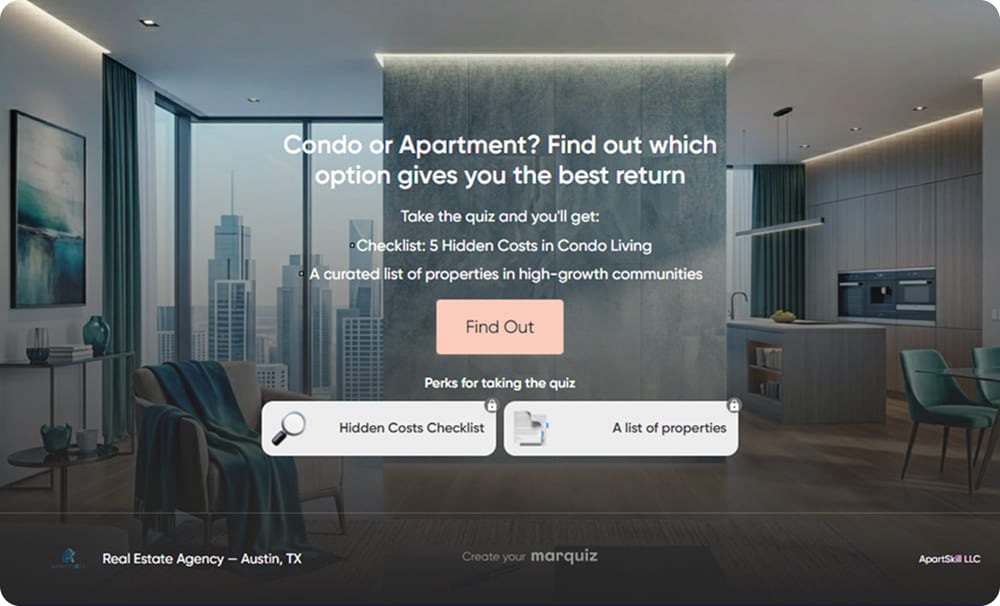
The headline names the question the buyer already has, and the perks say what they get for answering
Step 5. Ask only questions that affect the result
This is the principle that separates a quiz from a long form. Every question should do at least one job: calculate something, narrow a recommendation, segment the user, qualify them, or give the sales manager context. If an answer isn’t used anywhere downstream, cut the question. Each one you cut raises completion, and asking for data you’ll never use is how a quiz starts feeling like an interrogation.
Mixing formats helps too. Multiple choice for speed, sliders for ranges like budget or experience, image-based answers where the choice is visual. The format should follow the question rather than the other way around.
✍️ The question screen can also do a second job: warming the person up while they answer. In our pool enclosure case, the marketer put a short subheading under every question, each one naming something about the company, such as how many local permits they had handled. The questions stayed short, but by the last screen the person had read half a dozen reasons to trust the company.
Step 6. Add branching and personalization
Branching is what makes the answers matter. Without it, everyone walks the same path and the “personalized” result is a label on a generic offer.
The structure is straightforward:
- Answer A → questions 3A–5A → result A
- Answer B → questions 3B–4B → result B
Branching also works in reverse: instead of adding a path, you hide a question from people whose earlier answer already made it pointless. If someone says they’re a beginner, asking them to choose a roast level only makes them guess, so the question disappears for them and stays for everyone else.
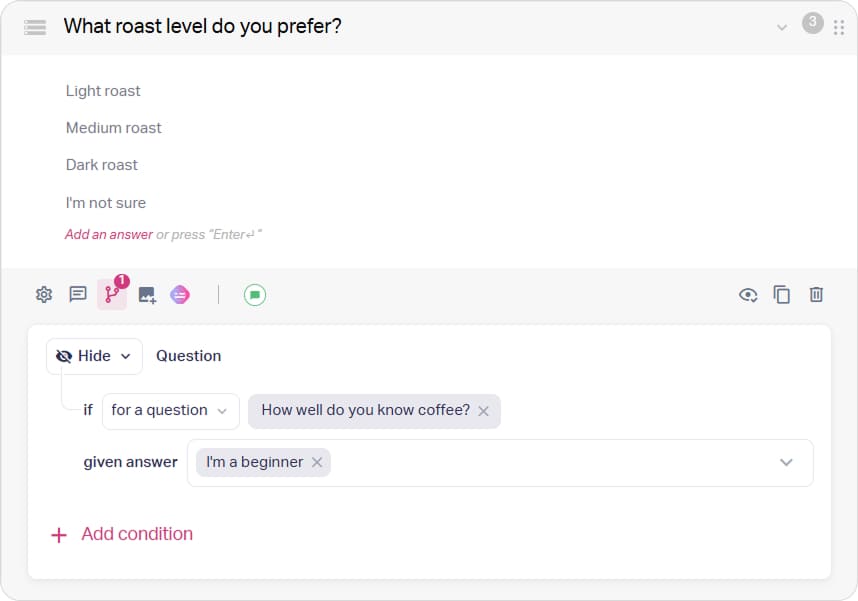
Branching can show or hide a question depending on what the person answered before
Step 7. Create a result worth finishing for
“Thank you for participating” is not a result. The final screen should give the person the thing they were promised on the start page, in a form they can act on. That usually means a recommendation, a calculation, a shortlist, an assessment, or a clear next step, plus one line explaining how their answers led to it. The explanation matters more than it sounds: it’s what makes the result feel earned rather than random.
👉 In our experience, overly complex or aggressive incentives reduce trust instead of raising completion. A useful, straightforward offer works better than a dramatic one.
Step 8. Decide where to collect contact information
You can show the form before the result or after it, and the trade-off is real in both directions.
Before the result: more contacts overall. People have already invested time and want to see what they earned.
After the result: fewer contacts, but higher intent. They’ve seen the value and are sharing details to act on it, not to unlock it.
Test both on your own traffic and keep the one that produces better leads, not just more of them.
💡 A case from one of our clients. A greenhouse company built a 6-question quiz qualifying by budget, greenhouse size, and payment method. The contact form asked for a name and phone number and nothing else. After submitting, users got a personalized selection, a discount reminder, and a free weed killer as a bonus. Two months on paid social traffic produced 384 qualified leads.
Step 9. Connect the quiz to your CRM and analytics
A quiz that collects leads into a dashboard nobody opens isn’t finished. Connect it to the CRM so answers arrive with the contact, to your email tool so sequences can branch on those answers, and to analytics so you can see where people leave. Add a notification for whoever makes the call: a fast first call converts better than a perfect one made the next day. Then send a test lead through the whole chain and check that the answers land in separate CRM fields rather than in one comment.
Step 10. Launch and test
Launch is the midpoint, not the finish. The real work starts when you can see which question loses people, which result converts, and which headline earns the click.
Watch three things first:
- The share of visitors who click “Start”
- The question with the steepest drop-off
- The contact form conversion
Then run an A/B test for each change separately: question order, form placement, wording. Rephrasing “Enter your email” as “Get your results” is the kind of small edit that shows up in the numbers.
Get lots
of leads — steadily
and affordably
A quiz delivers better results —
no extra ad budget needed

When quiz marketing works and when it doesn’t
A quiz is a tool, and like any tool it has cases where it’s the wrong choice. Knowing which side you’re on saves weeks of optimizing something that was never going to help.
| ✅ A quiz is especially useful when: | ❌ A simple form will probably work better when: |
| Choosing the product is genuinely difficult | The user already knows exactly what they want |
| Price depends on parameters, so no fixed number on the site would be accurate | You need one contact and nothing else |
| Your sales team asks the same three qualifying questions on every call | The product has a single obvious option |
| The audience needs segmenting before you can say anything relevant | The answers wouldn't change anything about what happens next |
| The offer can actually be personalized | |
| Qualification has to happen before someone expensive gets involved |
A quiz adds value when the answers change what happens next. If five questions end with the same “leave your phone number” for everyone, the interactivity is decoration. You’ve built a longer form.
Quiz marketing trends in 2026
The format itself hasn’t changed much: questions, a result, a contact. What’s changing is the quiz’s role. It’s turning from a friendlier lead form into the place where a business learns what a visitor wants and decides what should happen next. These are the shifts that stand out this year.
🔹 AI handles the first draft. Marketers feed reviews, sales call notes, and CRM data into AI tools to find recurring needs, then turn them into an offer and a question set. Quiz builders are following: the Marquiz AI generator turns a short brief into a draft quiz you can refine by hand. Next comes agentic work, where an assistant edits a live quiz through protocols like MCP.
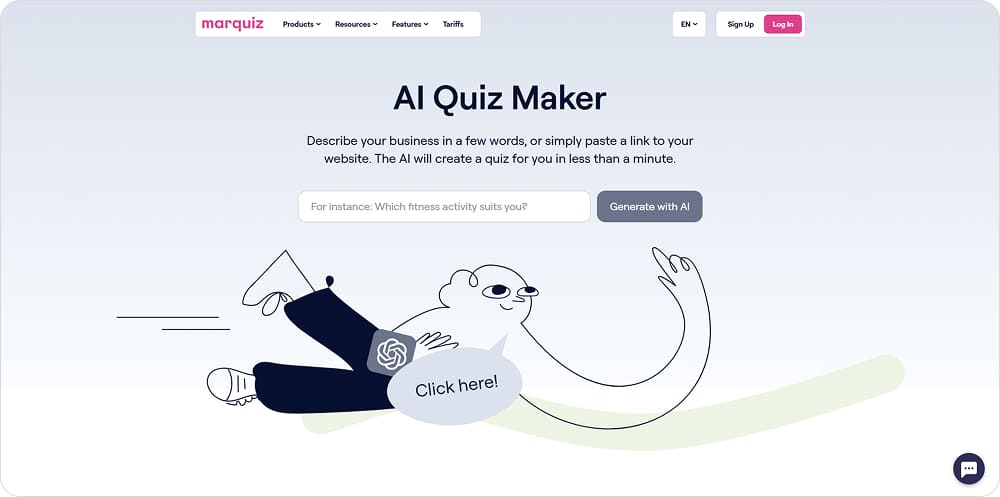
You describe your business in a few words or paste a link to your site, and the AI builds a quiz that fits
🔹 Quizzes are designed backward, from result to questions. Teams start with the outcomes: which segments they need to tell apart and what should happen to each one next. A renovation company might need three, for example: keys in hand, keys in a few months, still comparing prices. Only then do they write questions, and “When do you get your keys?” suddenly has a clear job.
🔹 Answers are treated as intent data. A landing page shows behavior, while a quiz adds what the person says about their own choice: budget, timeline, priorities. This is often called zero-party data. The trend is to put it to work after the lead arrives, routing hot leads to sales, nurturing the rest, and passing qualified outcomes back to ad platforms as offline conversions.
🔹 Lead quality is replacing CPL as the headline metric. A low cost per lead means little if none of those leads buy. Teams increasingly track cost per qualified lead, conversion to sale, and cost per customer, using quiz answers to connect the first click with the final deal.
🔹 Quizzes answer as well as ask. More quizzes now put useful content between the questions: a relevant case after a certain answer, a short explanation, a video tip. The person gives information and gets something back right away, which keeps them moving.
🔹 Shorter paths, more touchpoints. Instead of one long questionnaire, businesses collect only what they need at each stage, a habit known as progressive profiling. Some go further with a multi-quiz funnel, where one quiz leads to the next as the person gets closer to buying. Inside each quiz, branching keeps the path short, so one visitor sees four screens and another sees six.
⚠️ Please note: none of these trends replace the basics above. They all build on a quiz that already asks the right questions and delivers a useful result.
FAQ
What is quiz marketing?
Quiz marketing is a lead generation method that replaces a static form with a short interactive questionnaire. The user answers a few questions and receives a personalized result; the business receives a contact along with the answers behind it.
Do quizzes really generate leads?
Yes. People who are partway through something tend to finish it, and a useful result is worth more than a newsletter signup. How well it works depends on traffic quality and on how relevant the result is, so measure against your own previous numbers rather than an industry average.
How many questions should a marketing quiz have?
Five to seven is the usual working range, but the count matters less than the test: cut any question whose answer doesn’t change the result, the recommendation, or what the sales team does next. A tight seven-question quiz beats a padded four-question one.
Should I ask for contact details before or after the result?
Before the result usually produces more leads; after it usually produces warmer ones. If your sales team is at capacity, show the result first to filter for intent. If you need volume at the top of the funnel, ask first. This is one of the few settings worth testing on your own traffic.
What is a good quiz conversion rate?
There’s no single benchmark, because published numbers use different denominators: leads per quiz start, per landing page visit, or per ad click. A 40% start-to-lead rate and a 6% visit-to-lead rate can describe the same quiz. Define your denominator and compare against your own previous result.
What types of businesses can use quiz marketing?
Any business where the customer has a choice to make. It’s strongest in services, real estate, education, ecommerce with a wide catalog, B2B with expensive lead processing, and anything priced by parameters. It’s weakest where there’s one product and one obvious action.
Can I use a quiz instead of a landing page?
You can. A quiz works as a standalone landing experience, as a block inside an existing page, or as a pop-up. Cold ad traffic often does better with a quiz-first page, while warm site visitors respond better to a quiz where they already are. See six ways to embed a quiz on a website.
What is the difference between a quiz and a survey?
A survey collects information for you and usually gives the respondent nothing. A quiz gives the person a result they came for, and collects information as a side effect. That difference is why completion rates aren’t comparable between the two.
What data can marketing quizzes collect?
Anything you ask about and can use: budget, timeline, scope, preferences, experience level, current tools, location, readiness to buy. The practical limit isn’t technical: every extra question you can’t act on costs you completions.
How do I create a marketing quiz without coding?
With a quiz builder. In Marquiz you can start from a template, from scratch, or from an AI-generated draft, then add branching, build result pages, and connect your CRM without touching code. Our step-by-step guide walks through the setup.
Key takeaways
A quiz is a conversation, not a form. It helps people articulate what they need before you make an offer, which is why the contact arrives warmer.
Lead quality beats lead volume. A quiz that filters out low-intent contacts is doing its job even when the raw number drops.
Launch is the midpoint. The real gains come from reading drop-off data and fixing one thing at a time.