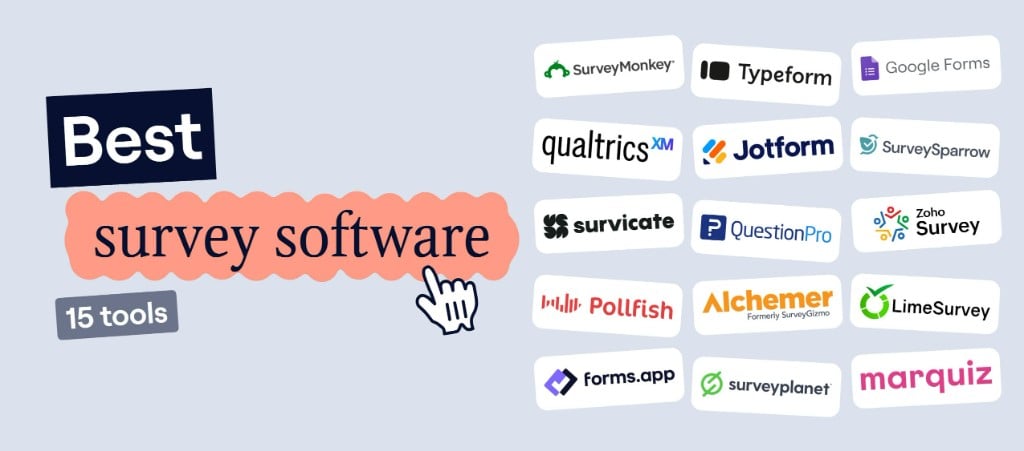

15 best survey software tools in 2026
No single survey platform works best for every team. A marketer collecting customer feedback, a researcher who needs the right respondents and a product team running an in-app NPS survey all need different things from a tool. So this guide isn’t about crowning one winner. Instead, we compare the best survey software of 2026 by use case, ease of use, question types, logic, analytics, integrations, pricing and the limits of each free plan.
Best survey software at a glance
Here are all 15 tools in one table. Click a name to jump to the full review. Price is the cheapest paid plan one person can buy, billed annually where possible; ratings are G2 scores. All prices and limits were checked on the vendors’ websites in October 2026.
How we tested. We signed up for the free plan or trial of each tool and built the same short market research survey in all of them. It had four questions: a screening question that ends the survey for non-buyers, a rating question, a multiple-choice question and an open-ended question. Where a tool had an AI builder, we gave it this prompt:
✨ Create a short market research survey for a small online coffee roastery that is testing demand for a monthly coffee subscription. Use exactly 4 questions, in English:
- “How often do you buy coffee beans or ground coffee for home?” Single choice: Weekly / Monthly / Rarely / Never. If the answer is “Never,” end the survey and show a thank-you message.
- “How interested would you be in a monthly coffee subscription?” Rating scale from 1 (Not interested) to 5 (Very interested).
- “What matters most to you when choosing coffee?” Single choice: Taste / Price / Origin / Convenience.
- “What would make you try a coffee subscription?” Open-ended, optional.
Add a one-sentence intro saying the survey takes about 1 minute. Do not add any other questions, contact fields or a lead form.
Where a tool limited prompt length, we used a shorter version. Only Typeform followed the prompt exactly: most AI builders skipped the screener or set it up wrong, so check the logic of any AI-generated survey before you send it.
| Name | Best for | Trial version | Price | Rating |
| SurveyMonkey | All-around surveys and analysis | Free plan | From $39/month | ★ 4.4 |
| Typeform | Conversational, on-brand surveys | Free plan | From $28/month | ★ 4.5 |
| Google Forms | Simple free surveys | Free | Free | Not rated separately |
| Qualtrics | Enterprise and advanced research | Free account + 30-day trial | From $420/month | ★ 4.4 |
| Jotform | Surveys with forms and payments | Free plan | From $34/month | ★ 4.6 |
| SurveySparrow | NPS and conversational surveys | Free plan + 14-day trial | From $19/month | ★ 4.4 |
| Survicate | Website and in-product feedback | Free plan + 10-day trial | From $89/month | ★ 4.6 |
| QuestionPro | Market research | Free plan + 10-day trial | From $99/month | ★ 4.5 |
| Zoho Survey | Teams in the Zoho ecosystem | Free plan + trial | From $7.42/month | ★ 4.4 |
| SurveyPlanet | Simple surveys, visual branching | Free plan | From $15/month | ★ 4.1 |
| Alchemer | Survey-driven workflows | 7-day free trial | From $26/month | ★ 4.4 |
| LimeSurvey | Open source and data control | Free (self-hosted or cloud) | From $36/month | ★ 4.2 |
| Pollfish | Reaching research respondents | Free to build, pay per response | From $0.95 per response | ★ 4.6 |
| forms.app | Forms and surveys for small teams | Free plan | From $29/month | ★ 4.5 |
| Marquiz | Interactive surveys for lead generation | Free plan | From $19/month | ★ 5.0 |
15 best online survey software tools
Each review below covers who the tool suits, its key features, pros, cons and pricing, plus a one-line verdict. The list moves from general-purpose online survey tools to more specialized ones, so the numbers are not a ranking.
1. SurveyMonkey: best all-around survey software
Best for: teams that want one reliable tool for most survey tasks.
SurveyMonkey is the survey tool most people know: it covers everything from question writing to analysis.
In our test, the AI builder copied our questions word for word but skipped the screener logic, so we added it ourselves. Check integrations before you commit: exporting to Google Sheets or Excel prompted an upgrade, and the app directory doesn’t flag paid ones in advance.
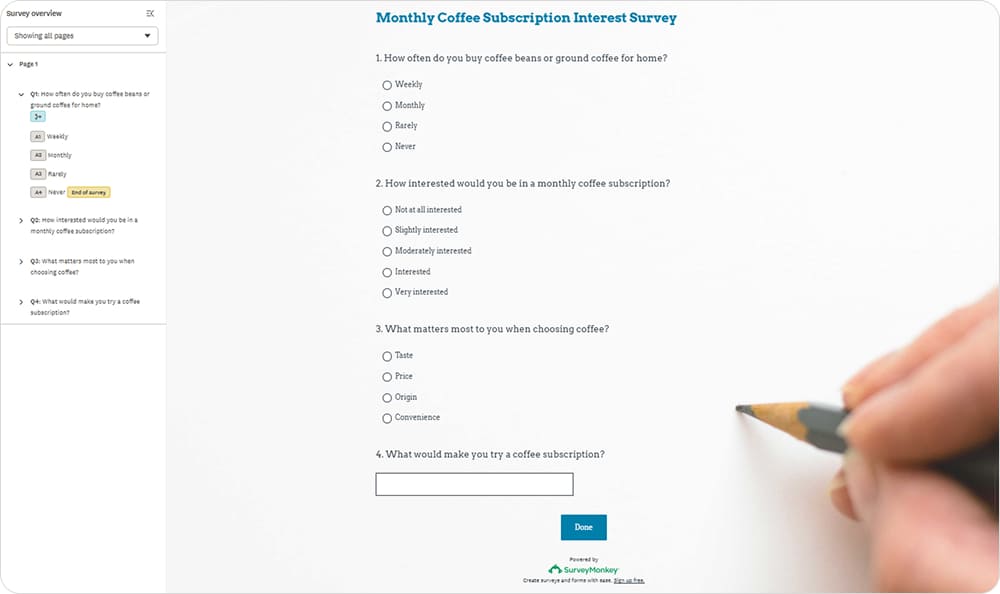
The SurveyMonkey preview shows the branching logic in the left-side menu
Key features
- An AI survey builder and a bank of tested questions
- Question skip logic on every plan, including the free one
- 200+ integrations, with Salesforce and Tableau only on Enterprise
- SurveyMonkey Audience, a paid respondent panel
Pros
✅ Familiar interface that respondents trust
✅ Strong analysis on paid plans: filters, comparisons and crosstabs
Cons
❌ No randomization, quotas or custom logo on the free plan
❌ The AI builder picks premium question types without warning free users
Pricing
Free plan: Basic, 1 user, unlimited surveys, up to 10 questions and 25 responses per survey
Paid plans: from $39 per month, billed annually.
Choose it if: you want one all-around tool and plan to pay for it.
2. Typeform: best for conversational and visually engaging surveys
Best for: marketing surveys where the experience matters as much as the data.
Typeform shows one question at a time, so surveys feel like a conversation, but responses are metered tightly on every plan.
In our test, the AI builder followed the prompt closely. On the free plan, it built every question as asked and added the intro line, the thank-you screen and the screener logic on its own.
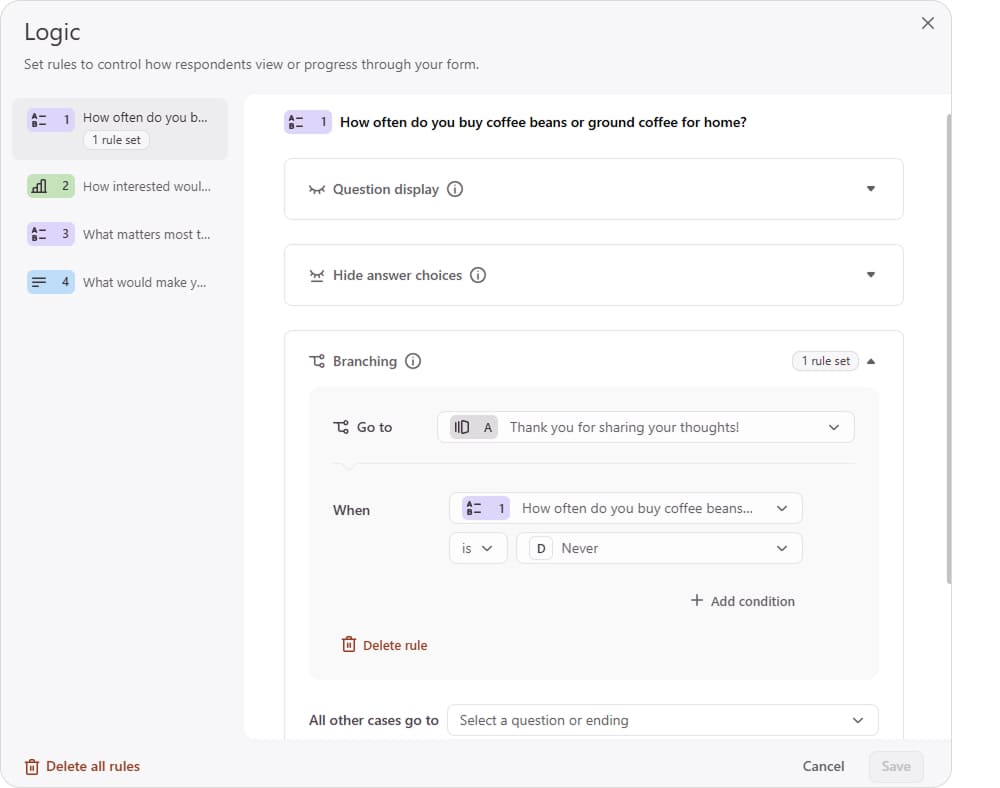
Typeform’s AI builder set up the screener rule on its own: “Never” sends respondents straight to the thank-you screen
Key features
- One-question-at-a-time layout with images, video and custom themes
- Logic jumps that route people based on earlier answers
- AI that turns a prompt into a draft survey
- Integrations with Google Sheets, Excel and HubSpot, available on the free plan
Pros
✅ Polished experience on mobile and desktop
✅ Easy to embed on a website or landing page
Cons
❌ Monthly response limits on every plan
❌ Removing Typeform branding requires a higher plan
Pricing
Free plan: unlimited forms and 10 responses per month across all of them; logic, AI form creation and spreadsheet export included
Paid plans: Basic from $28 per month, billed annually, for 1 user and 100 responses per month; branding removal starts on Plus.
Choose it if: survey design is part of your brand and you collect modest volumes.
3. Google Forms: best free survey tool for simple surveys
Best for: quick internal surveys, classrooms and simple feedback.
Google Forms is free, has no practical response limits and sends answers straight to Google Sheets.
In our test, we built the survey manually. The screener worked once we moved the other questions into a separate section, because Google Forms only branches between sections. There’s no AI builder on free accounts: Gemini form creation needs a paid Workspace or Google AI plan.
Google Forms works well for simple questionnaires, internal surveys, education and quick feedback. Specialized survey software makes more sense when you need your own branding, quotas, in-depth analytics or integrations beyond Google Workspace.
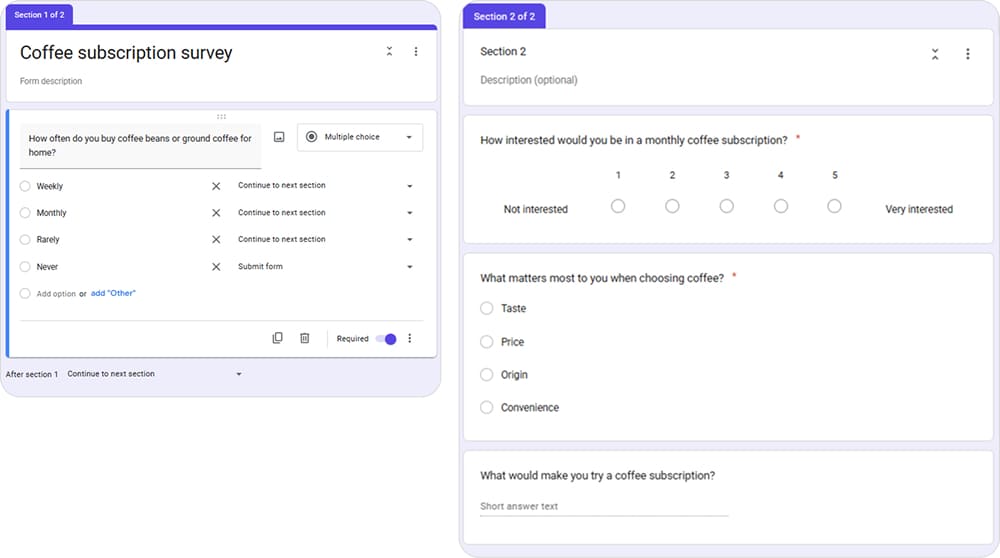
In Google Forms, the “Never” answer to the first question skips straight to submitting the form, so non-buyers don’t see the rest of the survey
Key features
- Unlimited forms, questions and responses
- Branching between sections based on answers
- Automatic summary charts and a live link to Google Sheets
- Quiz mode with scoring for training and education
Pros
✅ Free with no meaningful limits
✅ Almost no learning curve
Cons
❌ Limited design and branding
❌ Basic analytics; logic works only between sections
Pricing
Free plan: yes, free with a Google account
Paid plans: admin and security features come with paid Google Workspace plans.
Choose it if: you need a working survey in ten minutes and don’t mind a plain look.
4. Qualtrics: best for enterprise and advanced research
Best for: large organizations and research teams with complex projects.
Qualtrics is built for research that has to hold up under scrutiny, with the depth, pricing and learning curve to match.
The free account is easy to miss: the homepage pushes you toward a demo, but “Buy online” leads to a free sign-up. There’s no AI builder on the free account, so we built the survey by hand; skip logic for the screener works without upgrading.
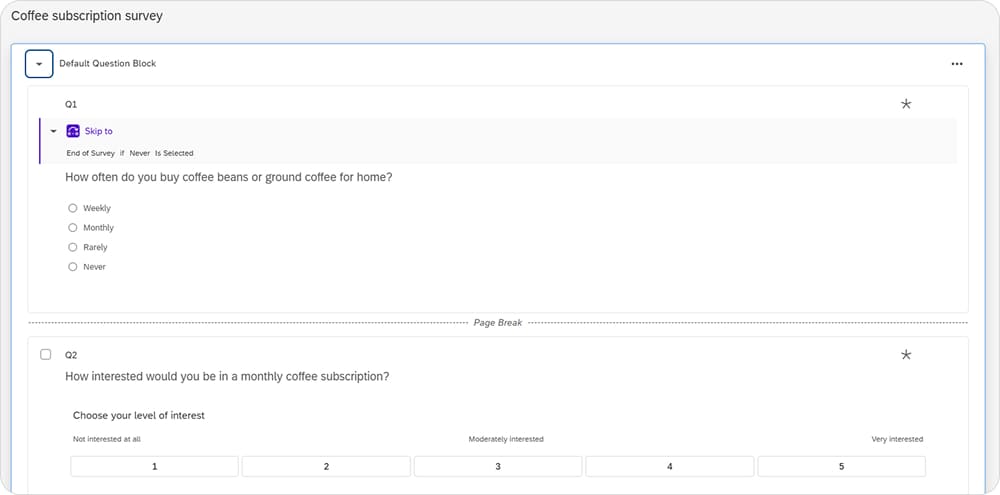
Qualtrics skip logic on the free account: answering “Never” sends respondents to the end of the survey
Key features
- Advanced logic: display, skip and branch logic, quotas and randomization
- Built-in statistical and text analysis
- 50+ expert-designed templates and pre-built research solutions
- Enterprise security, permissions and compliance options
Pros
✅ Research-grade methodology tools
✅ Scales to large programs with many teams
Cons
❌ Expensive for small teams
❌ Takes time to learn and set up
Pricing
Free plan: a free account with 3 active surveys, up to 30 questions per survey and 500 responses per user in total, deleted ones included; no email distribution
Paid plans: Strategic Research online from $420 per month for 1,000 responses; larger plans by quote, priced by responses and users.
Choose it if: you run serious research programs and have the budget and people to manage them.
5. Jotform: best for surveys that also need forms and payments
Best for: surveys that double as order forms, applications or sign-ups.
Jotform is a form builder at heart, so this survey maker shines when you also need payments, files or signatures.
In our test, the AI builder followed the prompt closely but tripped on the logic. For “Never,” it hid the rest of the survey along with the Submit button, so respondents hit a dead end and their answers weren’t saved. Removing one line from the rule fixed it. The rating question also came out as five stars without the labels we asked for.
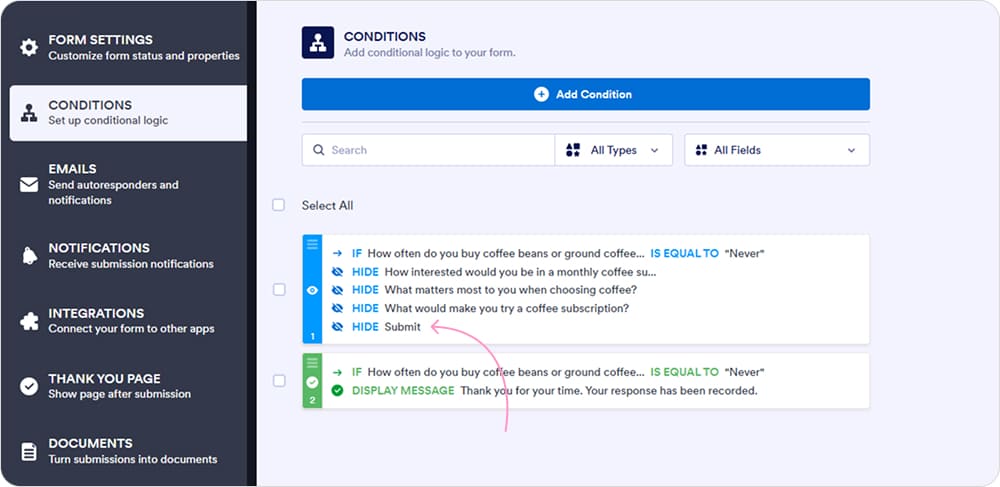
After we manually removed the “HIDE” option for “Submit,” Jotform’s screener worked properly
Key features
- Thousands of ready-made form and survey templates
- Conditional logic for showing, hiding and skipping fields
- Payments through dozens of gateways, including Stripe, PayPal and Square
- File uploads and e-signatures with Jotform Sign
- Jotform Tables, reports and 200+ integrations for working with submissions
Pros
✅ Very flexible: one tool for forms, surveys and payments
✅ Useful free plan for small volumes
Cons
❌ Survey analytics are basic next to dedicated survey tools
❌ Jotform branding on free forms
Pricing
Free plan: Starter, 5 forms, 100 submissions per month and 500 stored submissions in total
Paid plans: Bronze from $34 per month, billed annually, for 25 forms and 1,000 submissions; nonprofits and schools get 50% off.
Choose it if: you need forms, payments and surveys in one place.
6. SurveySparrow: best for NPS and conversational surveys
Best for: customer experience teams that run NPS and recurring feedback surveys.
SurveySparrow turns surveys into chat-like conversations and adds tools for measuring NPS and satisfaction on a regular schedule.
Its AI builder accepts prompts of only 200 characters, so we cut our brief to the four questions and the screener. In two attempts, it added a fifth NPS question we didn’t ask for and skipped the screener logic. We added it ourselves during the 14-day trial, since the free plan has no skip logic.
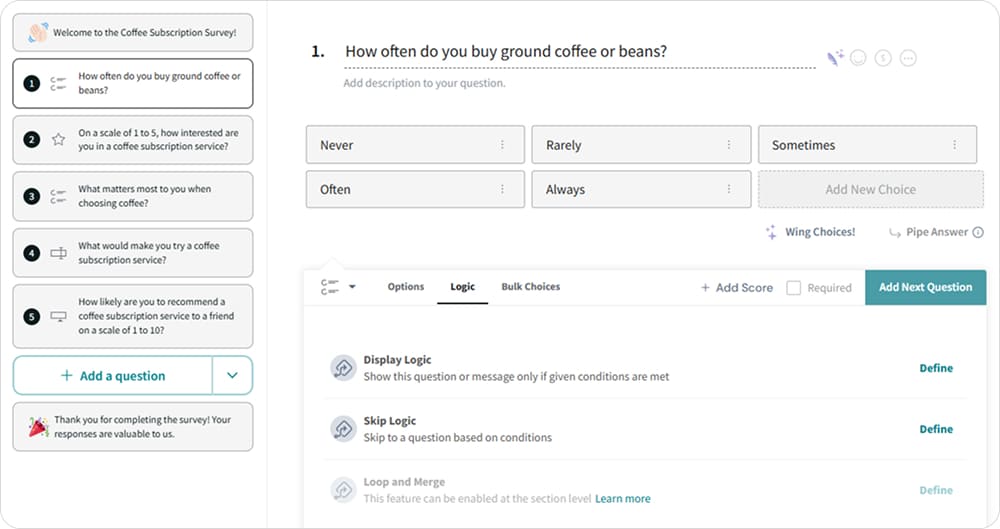
SurveySparrow’s AI builder added a fifth NPS question we didn’t ask for and skipped the screener logic
Key features
- Conversational and classic survey formats
- NPS, CSAT and CES surveys with dedicated dashboards
- Recurring surveys and automatic reminders
- Offline surveys, workflows and webhooks on Business and higher plans
Pros
✅ Engaging format that feels like messaging
✅ A full CX toolkit at a moderate entry price
Cons
❌ No skip logic on the free plan
❌ Custom branding and advanced question types sit on the Business plan
Pricing
Free plan: 75 responses per quarter, 3 active surveys and 10 questions per survey, with no skip logic
Paid plans: Basic from $19 per month, billed annually, for 1 user and 2,500 responses a year, with skip logic and email distribution.
Choose it if: NPS and customer satisfaction are the main reasons you need a survey tool.
7. Survicate: best for website and product feedback
Best for: product and marketing teams that want feedback in context.
Survicate is customer feedback survey software that brings the survey to people on your website, in your app or in email.
Its AI builder, available only during the 10-day trial, added the intro and all four questions but skipped the screener. It also labeled the interest scale from “Very unsatisfied” to “Very satisfied.” Branch logic is included even on the free plan, so we set up the screener with it.
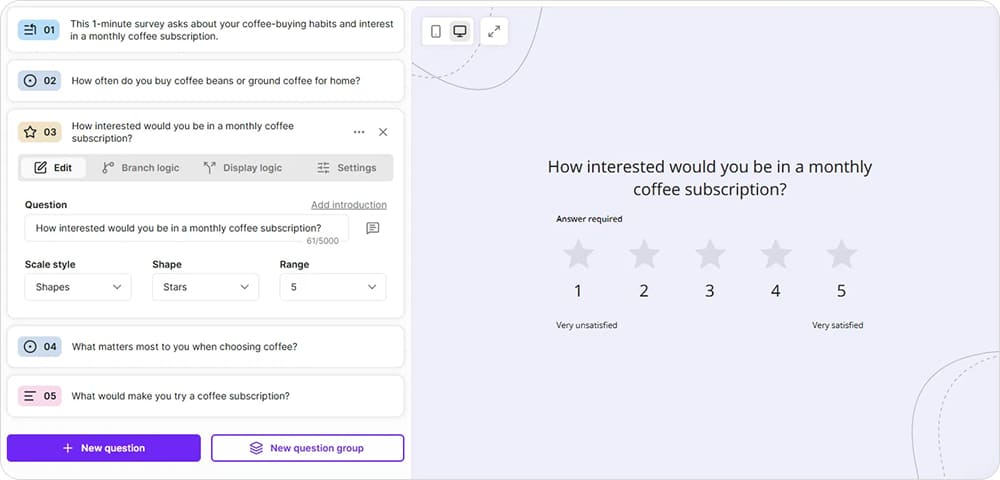
Survicate’s AI-generated rating scale came with satisfaction labels instead of interest ones
Key features
- Website surveys: pop-ups and embedded forms
- In-product surveys for web and mobile apps
- NPS, CSAT and CES templates with feedback analytics
- Targeting by page, behavior or user attributes
- Integrations with HubSpot, Intercom, Mailchimp and Zapier
Pros
✅ Shows surveys right after key actions, like a purchase or sign-up
✅ Precise targeting, such as first-time visitors or customers on a specific plan
Cons
❌ Tight free plan
❌ Pricing climbs quickly with response volume
Pricing
Free plan: 25 responses per month, up to 3 team members and 30-day data retention; listed only in the pricing FAQ
Paid plans: Starter from $89 per month for 100 responses, plus $0.89 per extra response; Growth from $114 per month, billed annually.
Choose it if: you want to know what visitors and users think right when they act.
8. QuestionPro: best for market research
Best for: teams that run market research regularly.
QuestionPro is survey software for market research, with advanced methods and its own respondent panel.
Its AI builder, QxBot, comes with the Advanced plan, so we tested it during the free trial. It got all four questions right but skipped the intro and the screener. We added the screener with skip logic, which is free, and “Never” respondents got a built-in “your profile does not fit our criteria” page.
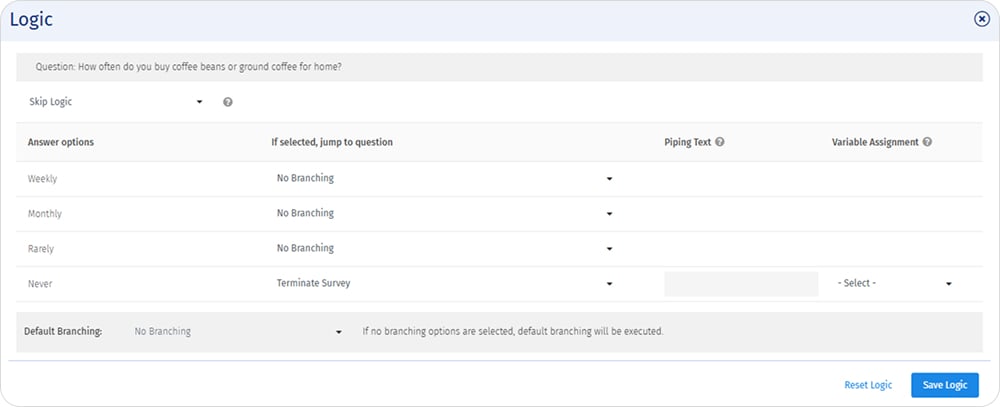
QuestionPro’s AI builder skipped the screener, so we set it up in the Logic panel: “Never” now terminates the survey
Key features
- 30 question types on the free plan and up to 52 on top plans
- A respondent panel for targeted samples
- A mobile app for offline field research, from Advanced
- Dashboards and advanced analysis
Pros
✅ Skip logic, piping and raw data export even on the free plan
✅ Cheaper than enterprise research suites
Cons
❌ The interface takes time to learn
❌ Paid plans are only billed annually
Pricing
Free plan: 1 user and 200 responses per survey, with skip logic and piping
Paid plans: Advanced from $99 per month, billed annually, with 25,000 responses a year and the AI builder; panel responses cost extra.
Choose it if: you need advanced research methods without a Qualtrics budget.
9. Zoho Survey: best for companies using the Zoho ecosystem
Best for: companies that already keep customer data in Zoho CRM and other Zoho apps.
Zoho Survey is solid online survey software that becomes far more useful inside the Zoho ecosystem.
In our test, the AI builder copied all four questions and the 1–5 scale exactly, but skipped the intro and the screener. During the trial, we added page skip logic that sends “Never” to a built-in disqualification page.
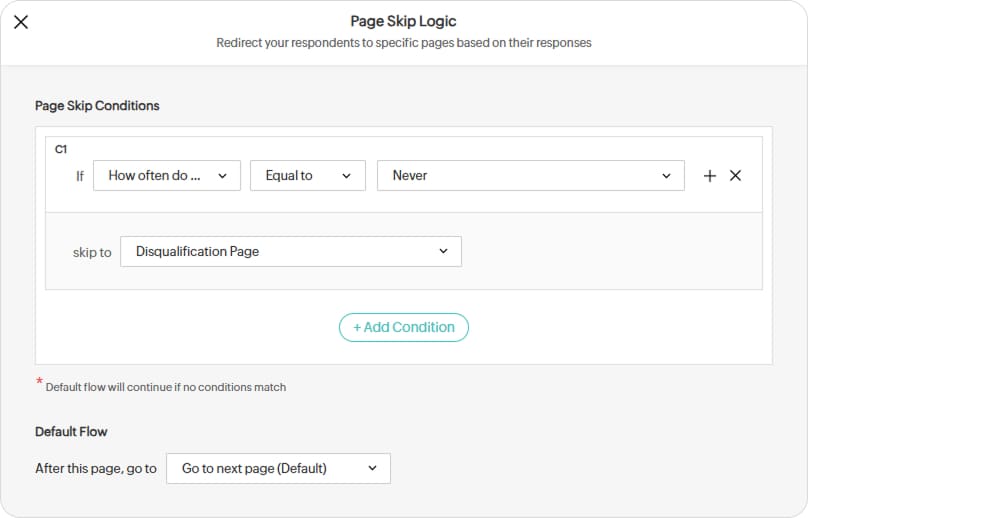
Zoho Survey: page skip logic routes “Never” respondents to a disqualification page
Key features
- Native integration with Zoho CRM, Campaigns, Sheet and Analytics
- Multilingual and offline surveys
- Trigger emails based on answers
- Option to buy responses for market research
Pros
✅ Fits right in if your team already works in Zoho
✅ The cheapest paid plan on this list, from $7.42 a month
Cons
❌ Fewer reasons to choose it outside the Zoho stack
❌ No skip logic on the free plan
Pricing
Free plan: unlimited surveys, up to 10 questions and 100 responses per survey, with email distribution but no skip logic
Paid plans: Basic from $7.42 per month, billed annually, with 12,000 responses a year, skip logic, quotas and export; Zoho CRM integration starts on Pro at $35 per month.
Choose it if: your customer data already lives in Zoho.
10. SurveyPlanet: best for straightforward surveys with visual branching
Best for: simple surveys and teams on a tight budget.
SurveyPlanet keeps things simple: its free plan has no caps on surveys, questions or responses. The catch is that branching, the feature most surveys need first, requires Pro.
On the free plan, we built our four questions by hand, each on its own editing screen, which made even a short survey slow to put together. The editor even let us set up the screener rule, but branching is a Pro feature, so in the live survey “Never” still led to the next question.
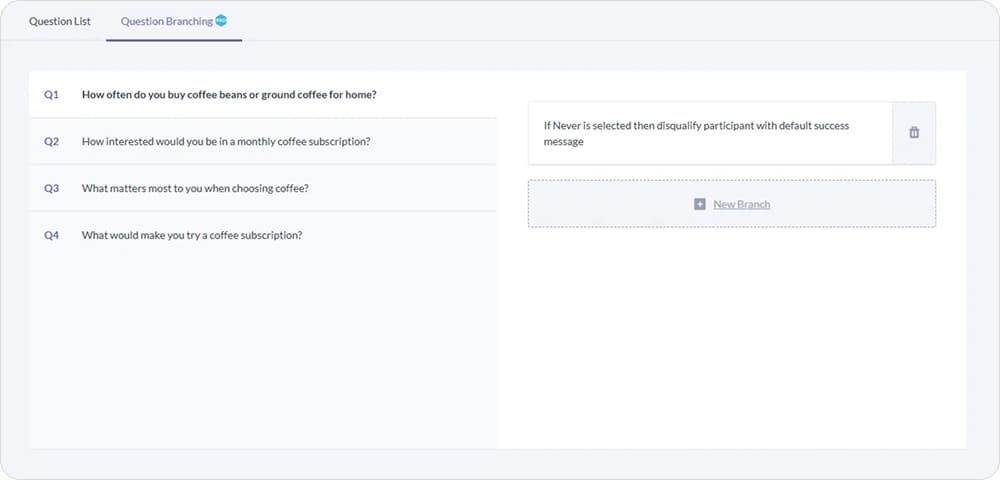
SurveyPlanet’s free plan allows you to set up logic, but it doesn’t work without a subscription
Key features
- Unlimited surveys, questions and responses on the free plan
- Visual question branching on Pro
- 90+ ready-made surveys and support for 30+ languages
- Exports, custom themes, white label and AI survey creation on Pro
Pros
✅ One of the most generous free plans on this list
✅ A clean survey builder that is easy to learn
Cons
❌ Branching, exports and custom themes require Pro
❌ Basic reporting on the free plan
Pricing
Free plan: unlimited surveys, questions and responses, but no branching, export or AI
Paid plans: Pro from $15 per month, billed annually, or $20 billed monthly.
Choose it if: you want a simple tool and only pay once you need logic.
11. Alchemer: best for survey-driven business workflows
Best for: teams whose survey answers must trigger actions in other systems.
Alchemer, formerly SurveyGizmo, focuses on what happens after a response: routing data and triggering follow-ups.
Its AI survey builder is reserved for custom Platform plans, so we built the survey manually during the trial. A single skip action on the first question handled the screener, sending “Never” respondents straight to the thank-you page. Skip logic is available on every plan, so this setup works on Collaborator too.
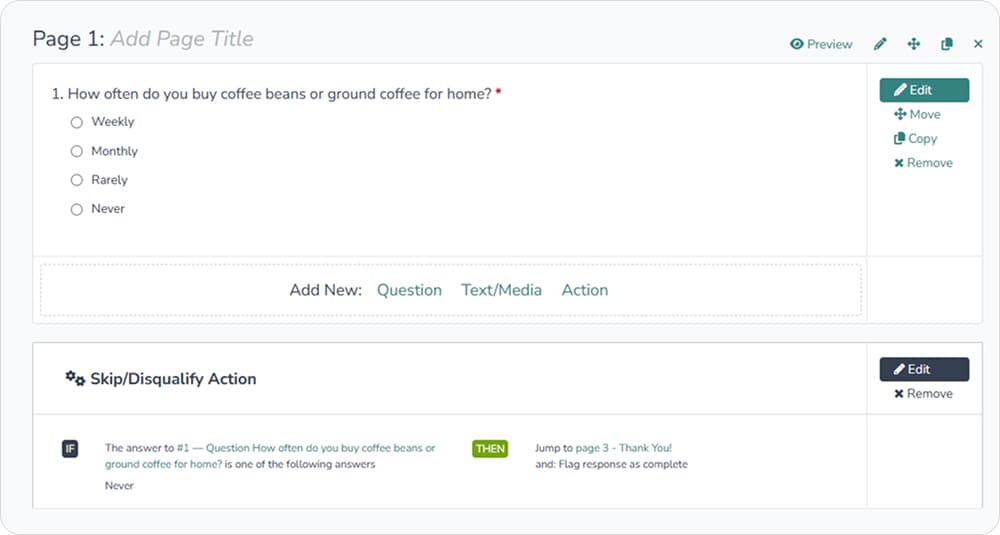
Alchemer: no AI builder on our plan, so we built the survey and its skip logic ourselves
Key features
- Skip and page logic on every plan; piping, advanced logic and respondent disqualification from Professional
- Alchemer Workflow for automating follow-ups
- Integrations with CRM and collaboration tools such as Salesforce and Slack
- Custom reporting and dashboards
Pros
✅ Deep customization for complex surveys
✅ Strong automation after the survey ends
Cons
❌ Per-user pricing adds up for larger teams
❌ No permanent free plan, only a 7-day trial
Pricing
Free plan: no; a 7-day free trial of the Professional plan, no credit card required
Paid plans: Collaborator from $26 per user per month, billed annually, or $55 billed monthly, for one to three users and 75,000 responses a year; Professional from $165 per user per month.
Choose it if: each response should start a process, not just add a row to a report.
12. LimeSurvey: best open-source survey software
Best for: organizations that need full control over survey data.
LimeSurvey is open-source software you can host yourself, so responses never leave your servers.
We built the survey by hand on the free plan. Question-level conditions have a visual designer, but group-level logic needs a short ExpressionScript line with question and answer codes, which is less obvious than a point-and-click rule. One group condition hid the last three questions from “Never” respondents. Our first attempt failed silently: we typed the wrong question code, and LimeSurvey hid the group for everyone without flagging the error.
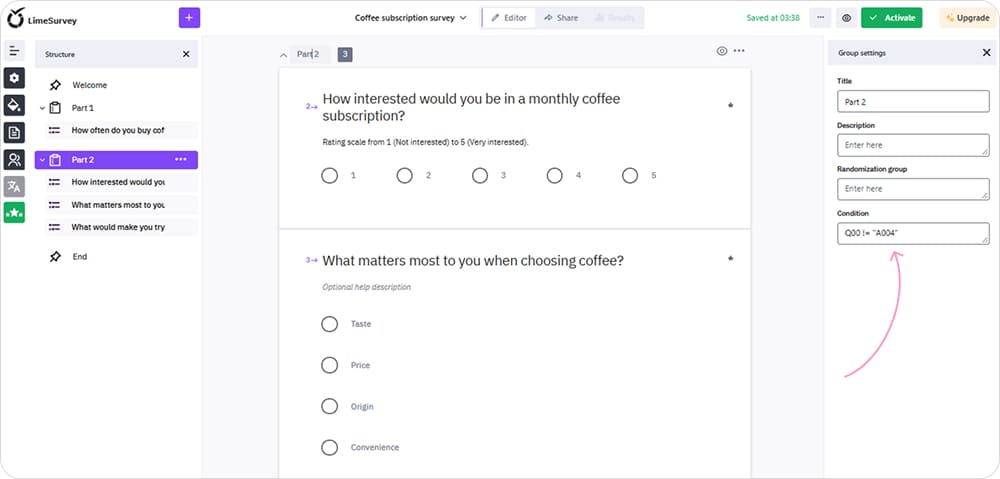
LimeSurvey: no AI help here. The survey and its logic are built manually, and group conditions are written as code
Key features
- Open source with self-hosting
- Advanced survey creation: conditions, quotas and assessments, available on every plan, including Free
- Multilingual surveys: add several languages to one survey and translate each question in the editor
- A cloud version for teams without their own servers
Pros
✅ Full control over where data is stored
✅ No license fees when self-hosted
Cons
❌ Self-hosting requires technical skills
❌ Group-level logic requires writing expressions instead of point-and-click rules
Pricing
Free plan: yes, with logic included and 25 responses per month; the self-hosted version is free too
Paid plans: Expert from $36 per month, billed annually, for 10,000 responses a year; Basic at $39 billed monthly.
Choose it if: data control matters more to you than convenience.
13. Pollfish: best for reaching market research respondents
Best for: researchers who need answers from people outside their own customer base.
Pollfish sells access to respondents: you build a survey, pick an audience and pay for each completed response.
Its free AI builder reproduced all four questions word for word. With Pollfish’s audience selected, it turned the first one into a screening question that disqualifies “Never” respondents. For a survey shared by link, it skipped the screener, and we added the rule in the logic editor. Every question is required, which is standard for panel research, so the open-ended question can’t be skipped. Our screener raised the price to $1.45 per response, or $870 for 600 responses.
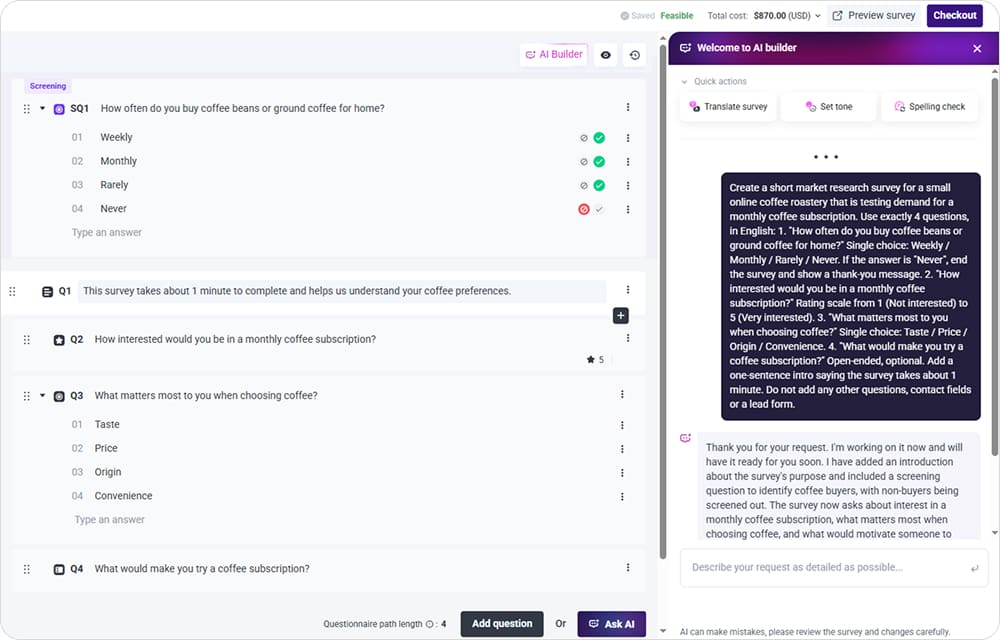
Pollfish: with its audience selected, the AI builder turned our first question into a screener. The cost in the top-right corner updates as you build
Key features
- Access to 250M+ consumers worldwide with demographic targeting
- A free AI survey builder
- Screening questions that filter out the wrong respondents
- Data-quality controls
- Advanced methods such as conjoint, MaxDiff and Van Westendorp pricing studies
Pros
✅ No subscription; you pay only for completed responses
✅ Fast turnaround for consumer research
Cons
❌ Costs grow with every response and targeting filter
❌ Less suited to surveying your own customers
Pricing
Free plan: free to build and share by link; you pay only for Pollfish respondents
Paid plans: DIY from $0.95 per completed response, plus $0.50 per screening question; full-service projects from $5,000 and enterprise packages from $10,000 a year.
Choose it if: you need a research audience, not just a questionnaire.
14. forms.app: best for flexible forms and surveys for small teams
Best for: small teams that need forms and surveys without a big budget.
forms.app is survey software for small business teams, with unlimited responses on its free plan.
Its AI builder followed our prompt a little too literally. It put the intro at the end and created an “End if Never selected” rule that showed the intro instead of ending the survey. It also left every question optional, the screener included, and turned the rating scale into a plain list of numbers. We fixed the logic ourselves.
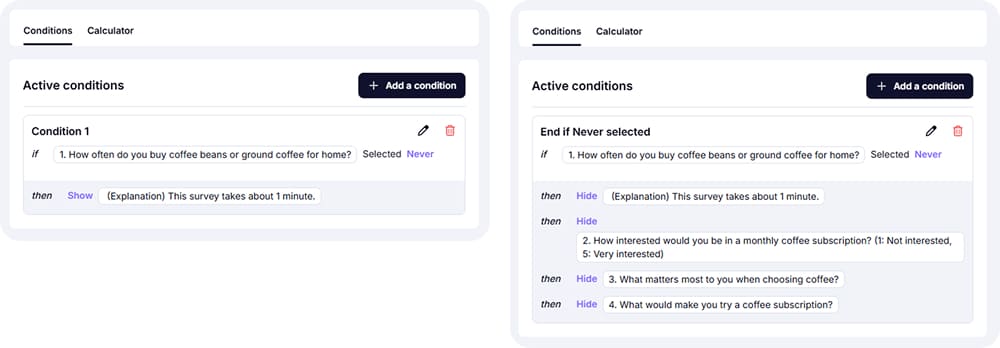
forms.app: on the left, the AI’s rule, which showed the intro to “Never” respondents instead of ending the survey; on the right, the same rule after we fixed it by hand
Key features
- AI that generates a form or survey from a prompt
- Conditional logic, scoring and pre-filled forms
- Payments and e-signatures
- 30+ field types, all available on the free plan
- 500+ integrations, with native ones for Google Sheets, HubSpot and Slack
Pros
✅ Unlimited responses on the free plan
✅ Easy to learn, with good design controls
Cons
❌ Only 5 forms on the free plan
❌ Lighter analytics than dedicated research tools
Pricing
Free plan: 5 forms, unlimited responses, conditional logic and AI features
Paid plans: Basic from $29 per month, billed annually, with 25 forms and branding removal.
Choose it if: you want one simple tool for forms and surveys with room to grow.
15. Marquiz: best for interactive surveys designed for lead generation
Best for: marketing surveys that should end with a lead, not just a data point.
A research survey ends with data for your team; a marketing survey ends with a next step for the respondent. The Marquiz lead-generation quiz builder has that step built in: answers → segmentation → lead capture → a personalized offer. Our guide to the quiz lead magnet shows how it works in practice.
Its AI builder offered three quiz concepts instead of copying our questions, which suits lead generation better than a fixed questionnaire. We built our four questions manually and hid the last three from “Never” respondents with point-and-click conditions.
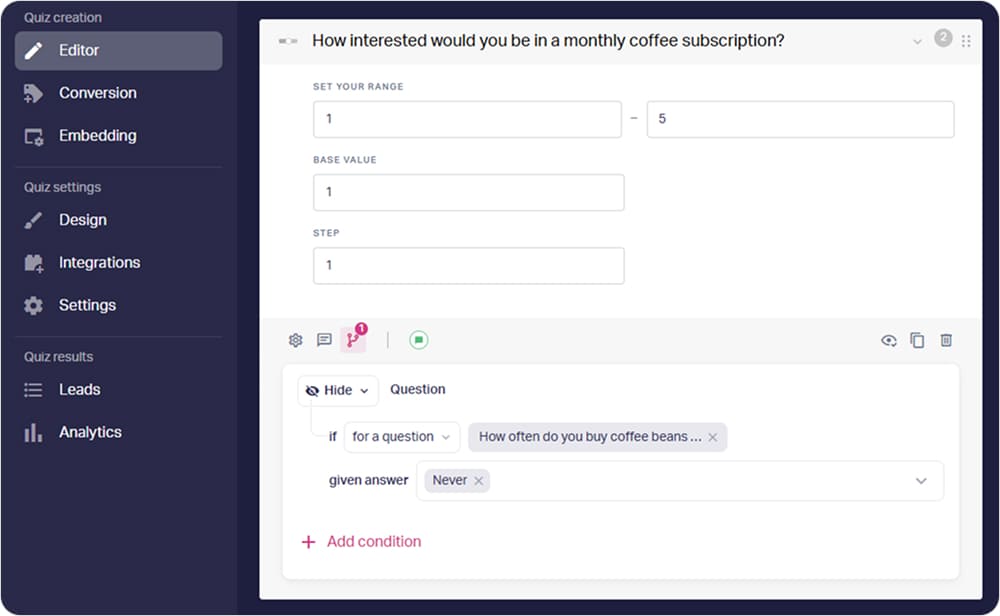
The point-and-click condition hides each follow-up question from “Never” respondents
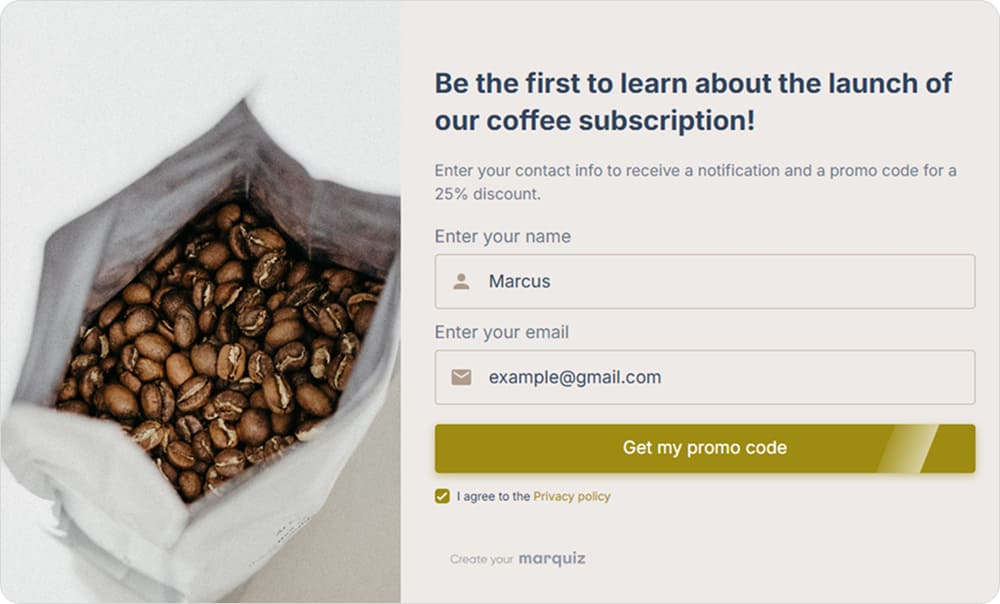
The lead form turns survey answers into a launch alert sign-up with a 25% promo code
Key features
- Branching logic, lead segments and personalized results
- Lead delivery to CRM, email or Telegram on every plan
- 150+ integrations and AI quiz generation
- Five embed options, from pop-ups to standalone pages
Pros
✅ Turns survey traffic into qualified leads
✅ No coding or design skills needed
Cons
❌ Not built for academic or large-scale research analytics
❌ Pricing is based on leads, not responses
Pricing
Free plan: 10 leads per month, no time limit
Paid plans: Start at $19 per month for 30 leads; Plus from $39 for 100 to 5,000 leads. See Marquiz pricing for details.
Choose it if: your survey’s job is to bring in and qualify leads.
Get lots
of leads — steadily
and affordably
A quiz delivers better results —
no extra ad budget needed

Free vs paid survey software: When should you upgrade?
Free survey software is often all you need. Paid plans add a lot, but more features don’t automatically mean better results for your team.
A free tool usually covers:
- small internal surveys
- simple customer feedback
- quick idea validation
- classes and education
- low-volume research
A paid tool starts to pay off when you need:
- advanced branching, screening or quotas
- your own branding instead of the vendor’s
- automation and CRM integrations
- richer analytics, filters and exports
- high response volumes
- several team members working on the same surveys
- enterprise security and compliance
- access to a respondent panel
The tipping point is usually one specific limit rather than the price itself. A small business might run happily on a free plan for a year until it needs logic to screen respondents or wants the vendor’s logo off its surveys. Before upgrading, write down the one feature you’re missing and check which plan of which tool unlocks it. That keeps you from paying for a large plan to fix a small problem.
Survey software vs form builders
The two categories overlap, and many products on this list do both. The difference is in what each is built to do well.
A form builder mainly collects structured information, such as:
- contact details
- registrations
- applications
- orders
Survey software is usually stronger at:
- asking a sequence of research questions
- branching people down different paths
- ratings, scales and NPS
- analyzing responses and spotting patterns
- reporting results to a team
In short, a form gathers data you already know you need, while a survey helps you find out something you don’t know yet. Analytics is often the clearest dividing line: a form builder shows you a list of submissions, while survey software helps you compare groups and see trends. If your main goal is a sign-up or an order, a form builder is enough. If you want to learn why people choose, buy or leave, look at dedicated survey software.
FAQ

Key takeaway
📌 The best survey software is the platform that matches what happens before, during and after the survey. Start with the use case: simple feedback, market research, customer experience, lead generation or enterprise research. Then compare question logic, analytics, integrations, response limits and price. A tool with hundreds of features is not automatically the best choice if your team only needs a fast way to collect and act on reliable responses. Try two or three tools on their free plans with the same survey, and the right one usually becomes obvious.