
Quiz lead magnet: How to create one that converts + examples
Most people who visit your site leave without a word. The few who fill in a contact form share a name and an email, and that’s all you know about them. A quiz lead magnet changes that: people answer a few questions, get a result made for their situation, and you learn what they need. Here’s how to create a quiz lead magnet step by step.
What is a quiz lead magnet?
A quiz lead magnet is a short quiz that gives people a personalized result in exchange for their contact details. It works like any interactive lead magnet, except the reward is built from the person’s own answers. Instead of a generic PDF, the visitor gets an answer to a question about their situation. That could be which plan fits their team, how much their renovation will cost, or what’s slowing down their career.
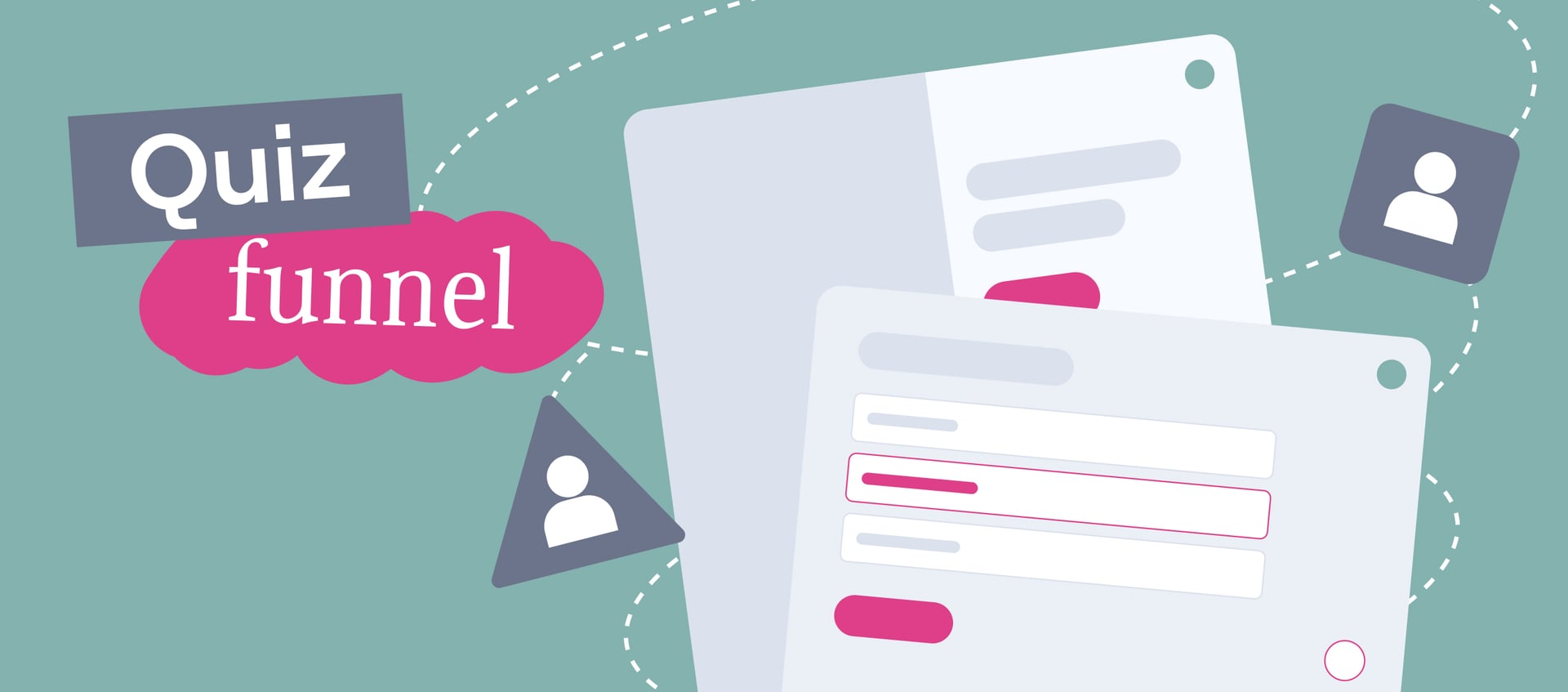
For your business, the quiz is part of a larger lead generation system called a quiz funnel. Each stage has its own job, and if one stage breaks, the ones after it get fewer people. Here’s the full path from the first click to the offer:
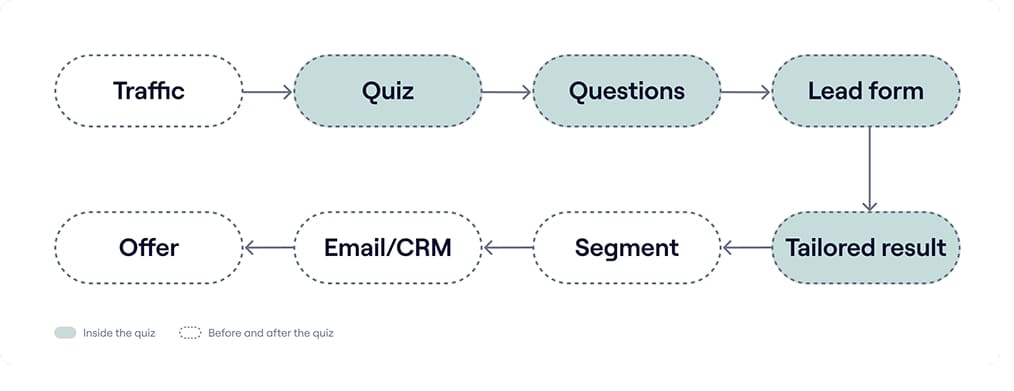
Let’s break the funnel down stage by stage. The middle column shows what the person does at each step, and the right column shows what has to be in place for them to move on to the next one. If you already run a quiz, the right column helps you find the weak spot. Say plenty of people start the quiz, but few leave their contacts: check the Lead form row first. The reason to share an email may be unclear, or the form may ask for too much.
| Stage | What happens | What it needs to work |
| Traffic | People arrive from ads, social media, your website, or email | The ad promises the same result the quiz delivers |
| Quiz | The start page explains what the person will get | One clear and compelling promise, such as “Get your personal cost estimate in 1 minute” |
| Questions | The person describes their situation, goals, and limits | Every question affects the result or tells you something useful |
| Lead form | The person leaves an email, phone number, or messenger contact | A clear reason to share it, and only the fields you’ll actually use |
| Tailored result | The person sees an answer based on their choices | The result feels specific, not generic like a horoscope |
| Segment | Answers sort the lead into a group: by budget, goal, or readiness to buy | Segments that match how you sell |
| Email/CRM | The lead and all answers land in your CRM or email marketing tool | Tags or fields that trigger the right follow-up |
| Offer | The person gets a next step that fits their segment | One offer per segment, not the whole catalog |
Why use a quiz as a lead magnet?
A static lead magnet gives everyone the same thing. An interactive lead magnet like a quiz adapts to the person, and that changes both the lead’s experience and what your team knows about them. Here’s what you get in practice.
Make the result feel personal
A personalized result answers the question the person came with. When the result mirrors their answers (“You picked a small team and a tight deadline, so here’s the fastest option”), it feels like advice rather than an ad. That’s why people are more willing to hand over their contact details: they’re getting something that couldn’t exist without their input.
Segment your audience without manual sorting
Every answer is a data point for audience segmentation. Budget, goal, company size, timeline: you collect it before the first conversation, so leads can go into different follow-up paths automatically.
Segmentation also shows you who your quiz is really for. Here’s one example from our own clients: a staffing company ran one quiz for all job seekers and got a 1.31% conversion rate at about $16 per lead. After looking at the answers, the marketer spotted two high-interest groups and built a separate quiz for each. The quiz for poultry plant workers converted at 12%, and the cost per lead fell below $4. You can read more cases like this in our guide to quiz marketing.
Give your sales team the context they need
With a regular form, your sales manager starts every call from zero. With a quiz, they already know what the person needs and what they’re willing to spend. Leads that don’t match your offer show up clearly, so your team spends time on qualified leads instead of bad-fit leads.
Turn the result into a next step
A downloaded guide ends the conversation. A quiz result can continue it: “Your score is 54 out of 100. Want us to go over the three weak spots with you?” The next step follows from the result, so it doesn’t feel like a sales pitch dropped out of nowhere.
Types of quiz lead magnets
Quiz lead magnets differ in what the person gets at the end. The type you choose shapes the questions, the results, and even how warm the leads will be. Here are the six most common types.
Assessment quiz
An assessment gives people a score or a level and shows what to improve. It works well for consultants, agencies, coaches, and B2B services, because the result leads naturally to the next question: “Want us to help you fix this?” Example: “How ready is your website for paid traffic?”

An assessment quiz promises an evaluation and a clear next step: a personal meal plan and a free consultation
Recommendation quiz
Here the person gets a product, plan, or service matched to their needs. This format suits e-commerce, SaaS, travel, and beauty brands with a wide range, where people get lost in the catalog. A skincare brand can run “Find your skincare routine in 60 seconds” and show two or three products instead of fifty.
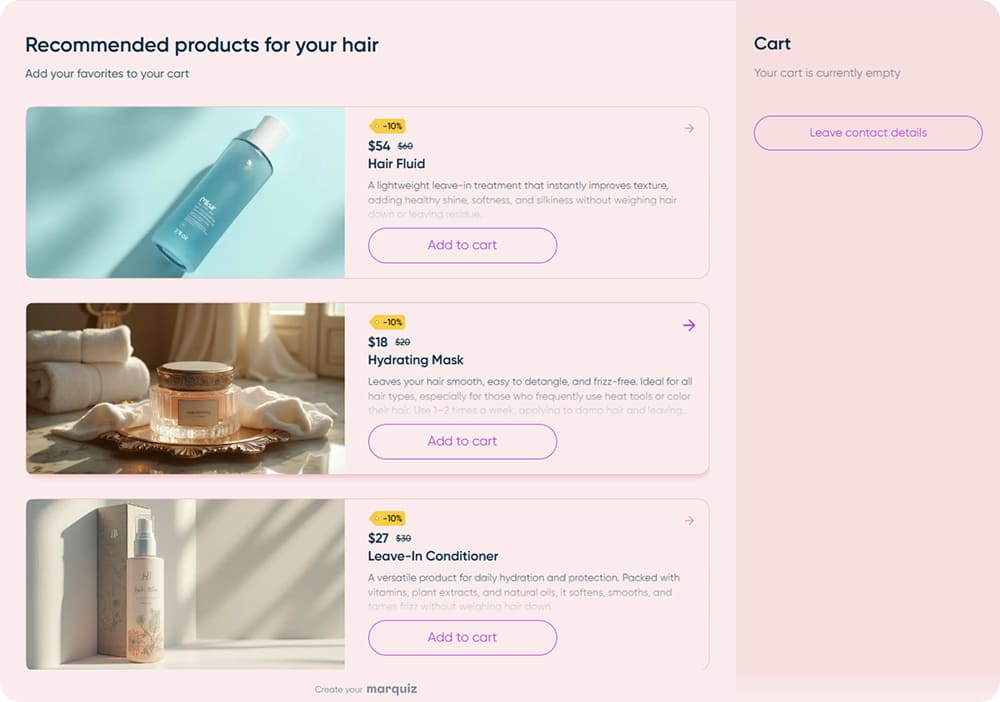
Instead of the whole catalog, the quiz shows three products matched to the person’s hair and a discount on each
Personality quiz
A personality quiz tells people something about themselves: their style, their type, their approach. It fits fashion, interior design, education, and other niches where taste matters more than specs. People enjoy sharing their results from quizzes like “What’s your interior style?”, so this format is likely to bring extra reach.
Calculator
A calculator answers the most common question in services: “How much will it cost?” People describe their project and get a price or time estimate. It’s a natural fit for renovation, construction, cleaning, auto repair, and events. Example: “Calculate the cost of your kitchen remodel.”
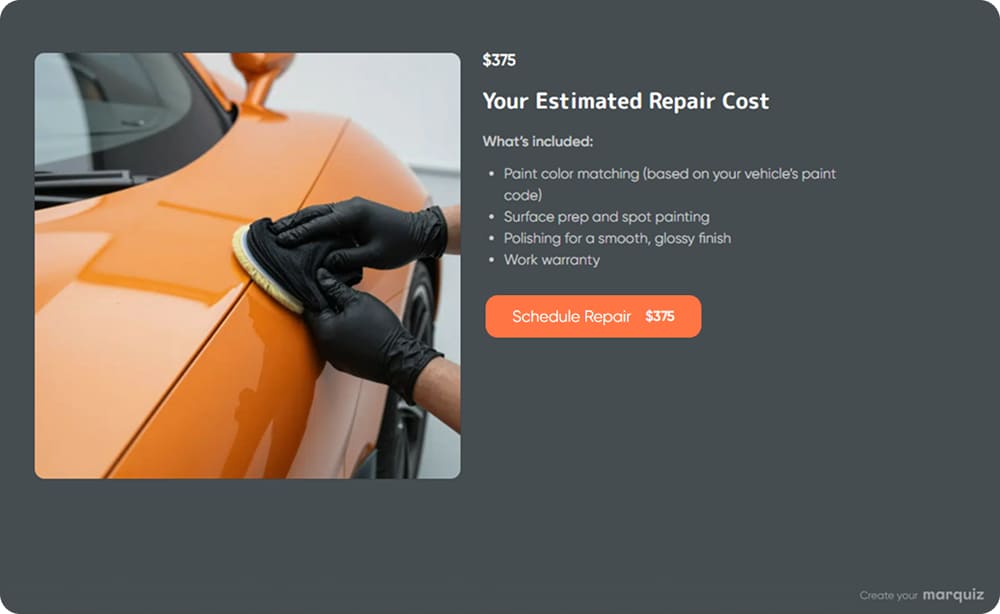
The calculator shows an estimated price and what it includes, with a button to book the repair right away
Knowledge quiz
A knowledge quiz tests what people know and explains the correct answers. Online courses use it to show the gap between what a student knows and what the course teaches, and media use it to keep readers on the page. Example: “Can you spot a phishing email?”
Qualification quiz
A qualification quiz answers “Is this a good fit for me?” and shows the next step. In B2B, high-ticket services, and recruiting, it filters out bad-fit leads before anyone spends time on a call. Example: “Is our program right for your team?”
Many quizzes combine types. A calculator can also recommend a package, and an assessment can end with a qualification question.
Our take: calculators and recommendation quizzes attract people who are already choosing, so leads tend to be warmer and closer to a purchase. Personality and knowledge quizzes reach people earlier, when they aren’t looking for a solution yet. They bring more reach and shares, but those leads usually need more nurturing before a sales call.
How to choose a quiz lead magnet idea
The most common mistake is starting with the format: “Let’s make a fun quiz.” A better starting point is the question your audience already asks you. If the quiz answers that question well, people will finish it and leave their contacts.
Match the question to the type:
- If people keep asking how much it will cost, build a calculator.
- If they ask which option to choose, build a recommendation quiz.
- If they want to know whether they’re doing it right or why something isn’t working, build an assessment.
- If they wonder whether your offer is right for them, build a qualification quiz.
- If they don’t know you yet and haven’t formed a question, a personality or knowledge quiz is a softer way in.
Where do you find these questions? Look at sales call notes, support chats, social media comments, your FAQ page, and search queries that bring people to your site. The questions that come up again and again are your best quiz ideas.
Before you commit, run the idea through three quick checks. First, does the result depend on the answers? If everyone gets the same thing, you’ve built a form with extra steps. Second, is the result useful on its own? Third, does the result lead naturally to your offer?
How to create a quiz lead magnet step by step
Once you have the idea, the build itself follows a clear order. The key is to work from the result backward: decide what people will get before you write a single question. Here’s the process we recommend.
Step 1: Write the promise
Write one sentence: “Answer [number] questions and get [specific result].” For example: “Answer 6 questions and get a renovation estimate for your apartment.” This sentence becomes the headline on your start page and the core of your ad copy. If you can’t write it in one line, the idea needs more work.
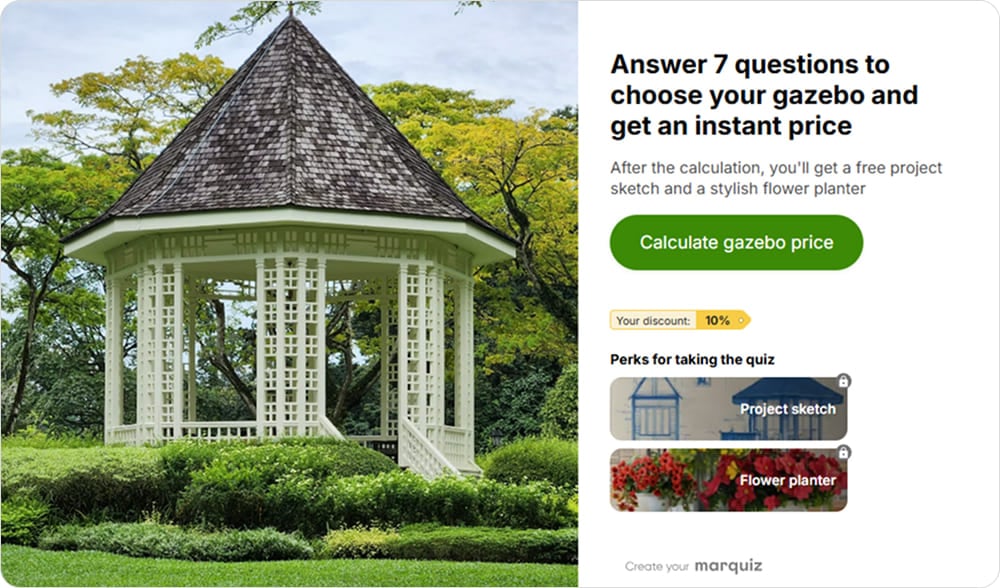
The start page promises a specific result in 7 questions and shows the bonuses up front
Step 2: Design the results first
Decide which results people can get. Usually 3–5 is enough. For each result, answer three questions: who gets it, what exactly they receive, and what next step makes sense for them.
Let’s take an invented example: a language school building a quiz called “What English course fits your goals?” The results could be “Beginner foundations,” “Conversational practice,” and “Business English.” Each one leads to a different course and a different follow-up.
Step 3: Write the questions
Now write questions that help decide which result the person gets. A good rule: every question should either change the result, place the lead in a segment, or give your sales team something they need. If a question does none of these, cut it.
Start with easy, visual questions and save the personal ones, like budget or phone number, for later. Picture-based answers work well for style and product questions. For anything people might not know, add an “I’m not sure” option, because a stuck person usually leaves.
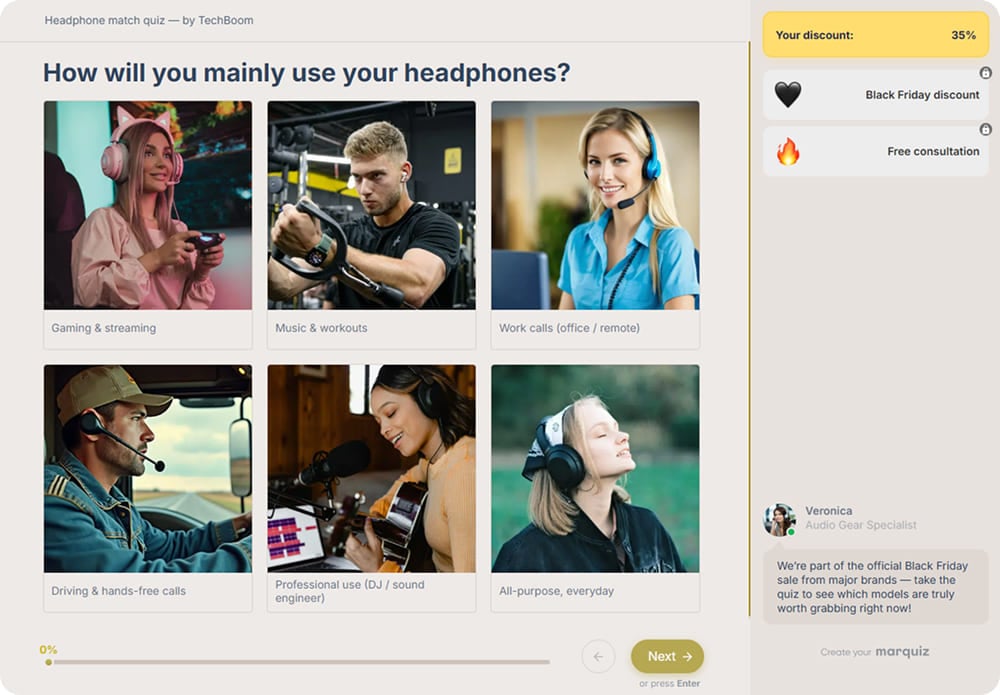
The first question of this quiz is easy and visual: people pick the picture that looks like them
Step 4: Set up the logic
Logic connects answers to results. There are two main ways to do it. Branching sends people down different paths depending on their answers: a small business owner sees questions about budget, and a corporate buyer sees questions about integrations. Scoring assigns points to answers and shows a result based on the total, which is the standard setup for assessments.
Step 5: Add the lead capture form
The lead capture form usually goes right before the result. At this point the person has already invested time and wants to see what they get, so they’re more willing to share contact details. You can also show a short result first and ask for contacts to send the full version, which gives you fewer leads but more motivated ones.
Keep the form short. Ask only for the fields you’ll actually use, and say what happens next: “We’ll email your full plan in a minute.” Add a consent checkbox and a link to your privacy policy.
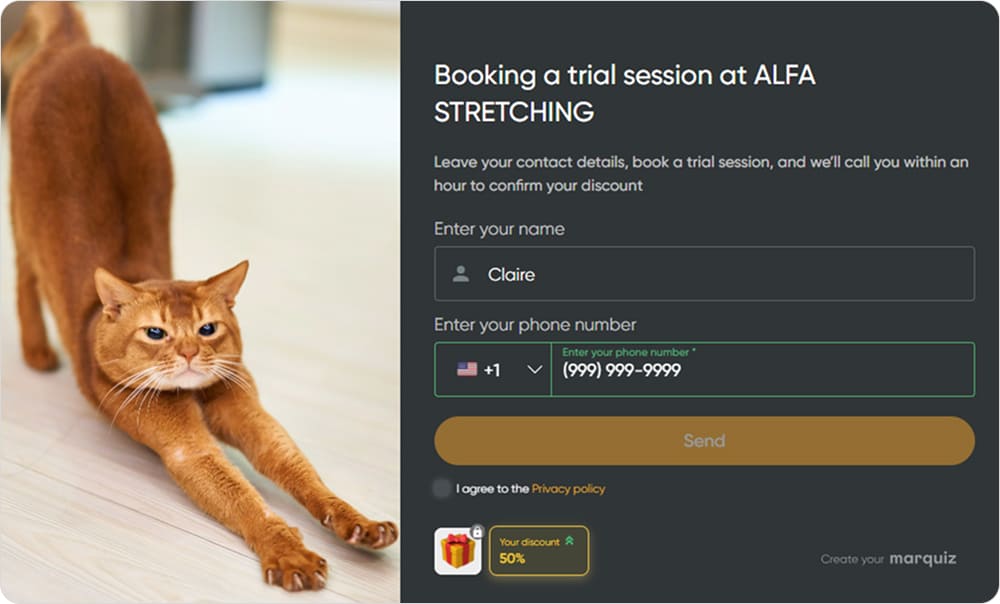
The form tells people what happens next: a call within an hour to confirm their discount
Step 6: Build the personalized result
The result page is where your quiz earns trust. Mention the person’s answers so they see the result was made for them, and give real value right on the page, even if you also send a longer version by email. A result that only says “Thanks, we’ll contact you” breaks the promise from the start page.
Step 7: Add one clear call to action
Each result should lead to one next step that fits the segment. A lead with a high budget and a close deadline gets “Book a call with a specialist.” A lead who is just exploring gets a guide or an email course. One button per result works better than a menu of options.
Step 8: Connect your CRM and email
Send every lead to your CRM or email marketing tool along with the answers. Use them as tags or fields to trigger the right sequence: the first email with the result goes out right away, and the rest depend on the segment. When hot leads reach your sales team, the manager can see the answers and skip the questions the person already answered.
Complete quiz lead magnet example
Let’s put all the steps together with a real campaign from one of our own clients. A company selling online HR training courses wanted more enrollments in India and the USA, but it had a limited ad budget and two very different audiences to reach. Instead of a generic course brochure, it offered something only a quiz could create: a personal career plan for each participant. Here’s how each part of the funnel worked.
The promise. The start page offered: “Receive Your HR Career Development Plan!” The plan was the lead magnet, and it couldn’t exist without the person’s answers. That made sharing contacts feel like a fair trade.

For the US market, the start page featured experienced HR professionals and a clear career-growth promise
The questions. The quiz had eight questions: job level in HR, preferred career path, preferred projects, areas of expertise, key achievements, task preferences, company size, and interest in a free mentorship consultation. The first question qualified leads by career stage. The last one showed who was ready for a conversation with the team.
Localization. The start pages looked different for each market. For India, the images featured young professionals starting out in HR. For the US, they showed more experienced and diverse professionals.
The lead form. People left their email and phone number to receive the plan by email. The promise of getting the plan in their inbox gave them a clear reason to type in a real address.
Segmentation and offer. The answers about job level, company size, and interest in mentorship helped match each lead to the right course and showed which leads to contact first.
Traffic. The quiz ran on Instagram and Facebook ads, plus LinkedIn ads targeting HR professionals.
🎯 The result: 700+ leads in 3 months with a conversion rate of up to 36%
Why it worked: the result was personal and practical, and it pointed directly to the course the company sold. A limit worth noting is that the case reports leads and conversion rate, not revenue, and the quiz ran in two markets with different visuals. So you can’t credit all of the result to one element; the offer, the targeting, and the localization worked together.
Get lots
of leads — steadily
and affordably
A quiz delivers better results —
no extra ad budget needed

Quiz lead magnet examples by industry
The same principles work across very different businesses. What changes is the reward: a cost estimate, a personalized selection, or a special offer that makes sense for business clients. Here are four short examples from Marquiz clients.
Home services: Premium house cleaning
A cleaning company wanted orders for premium cleaning of country houses. Its website looked good and had an “Order” button, but leads were expensive. The team built a landing page for house owners with a “Calculate the cost” quiz. To get an estimate, people answered what type of cleaning they needed, how big the house was, and whether the yard needed cleaning too. That last question worked as an upsell.
🎯 The result: 162 leads in 3 months, with cost per lead at least four times lower than before
Of the three ways they placed the quiz (behind a button, as a widget, and embedded in the page body), the embedded version worked best. The client doesn’t share sales data, so the case shows lead volume and cost, not revenue.
Home and garden: Greenhouse supplier
A greenhouse company built a six-question quiz to qualify leads by budget, greenhouse size, and payment method. The contact form asked only for a name and phone number. After submitting it, people received a personalized selection of greenhouses that matched their answers, a reminder about their discount, and a free weed killer as a bonus.
🎯 The result: 384 qualified leads in 2 months from paid social traffic
E-commerce: Fashion store
A premium fashion store couldn’t mention brand names in its ads. So it built a quiz that put together a complete outfit based on age, style, and color type. A budget question split the audience into two segments: premium buyers and people looking for sales on older collections. Everyone who finished the quiz got a small discount on items from their selection.
🎯 The result: 20–30 leads a day
B2B: Wholesale coffee supplier
Amenari, a wholesale coffee supplier, built a three-question quiz to qualify business leads: order volume, coffee variety, and timeline. Instead of a personalized result, the reward was an offer that made sense for business buyers: a tasting set at a special price and a free consultation with the company’s head barista.
🎯 The result: conversion rate grew from 2.58% to 9% on average after optimization, peaking at 18%
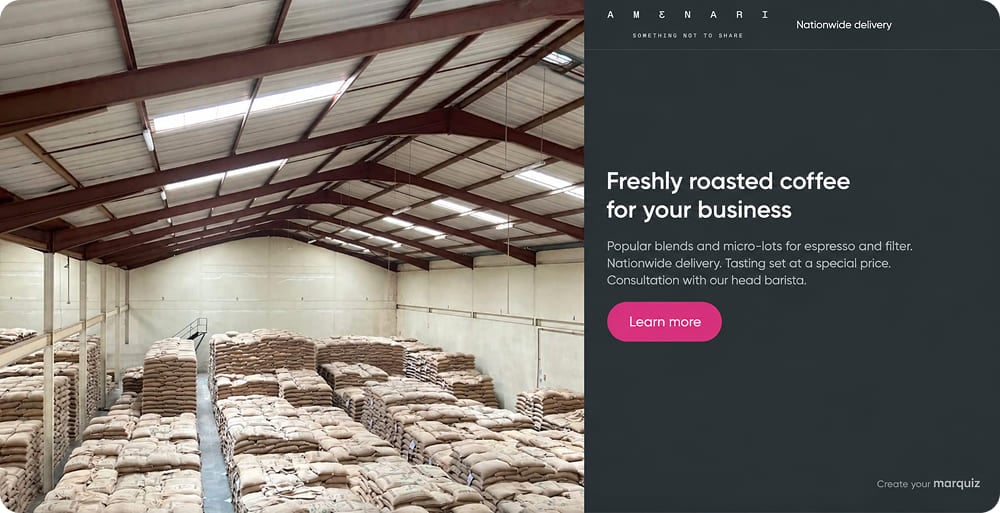
The quiz offers what business buyers actually want: a tasting set and expert advice
How to measure quiz lead magnet performance
A quiz funnel has several stages, and each one can leak. If you only look at the final number of leads, you won’t know what to fix. Track these metrics to find the weak spot:
| Metric | How to calculate | A low number usually means |
| Start rate | Quiz starts ÷ quiz views | The headline or promise doesn’t grab attention |
| Completion rate | Quiz completions ÷ quiz starts | A specific question is confusing, too personal, or unnecessary: check where people drop off |
| Lead capture rate | Leads ÷ people who reached the form | The form is too long or the reason to fill it in is unclear |
| Conversion rate | Leads ÷ visitors | The overall health of the funnel |
| Cost per lead | Ad spend ÷ leads | Targeting or the quiz itself needs work |
| Lead-to-customer rate | Customers ÷ leads | The quiz attracts the wrong people, or the promise doesn’t match the offer |
The last metric is the one people forget, and it can change your conclusions. A band that plays at weddings tested two versions of its funnel. The regular quiz converted 6% of visitors into leads. A version with a short landing page before the quiz, showing videos from past events and the band’s level, converted only 1.1%. At first glance, the second version looked like a failure.
Then the band counted sales. Out of 15 leads from the regular quiz, one booked a performance, about 6%. Out of 5 leads from the version with the landing page, two booked, which is 40%. Fewer people left their contacts, but those who did already understood what the band offered and how much it might cost. The test ran for two weeks without a proper A/B split, and the numbers are small, so treat it as a signal rather than proof. Still, the point stands: judge a quiz by what happens after the lead, not just by the lead count.
Tip: compare results by segment and by quiz result. If one result converts to sales twice as well as the others, it’s worth putting more of your ad budget toward the people who get it.
How to create a quiz lead magnet with Marquiz
Now let’s see how to build a quiz lead magnet in Marquiz. The reward can live in two places: the result, which the quiz builds from the person’s answers, and perks, which are files or links people get for completing the quiz. You don’t need a developer or a designer for either.
AI quiz generator and templates. Describe your business and your audience, and the AI quiz generator creates a draft with questions, results, and an offer. You can also start from a ready-made template for your niche and adjust it.
Perks. A perk is the lead magnet itself: a PDF catalog, a checklist, a guide, or any other file or link. Upload the file right into the quiz or add a link to it. Show perks on the start page so people know what they’ll get before the first question, and unlock them on the thank-you page after the contact form.
Different perks for different segments. This is where a quiz beats a regular download. Set a display condition for each perk using branching, and people get the file that matches their answers. A real estate agency can send one selection of listings to families looking for a home and another to investors. A kitchen renovation company can give a “Common mistakes in small kitchens” checklist to people planning a compact kitchen and a budget planner to those focused on cost.
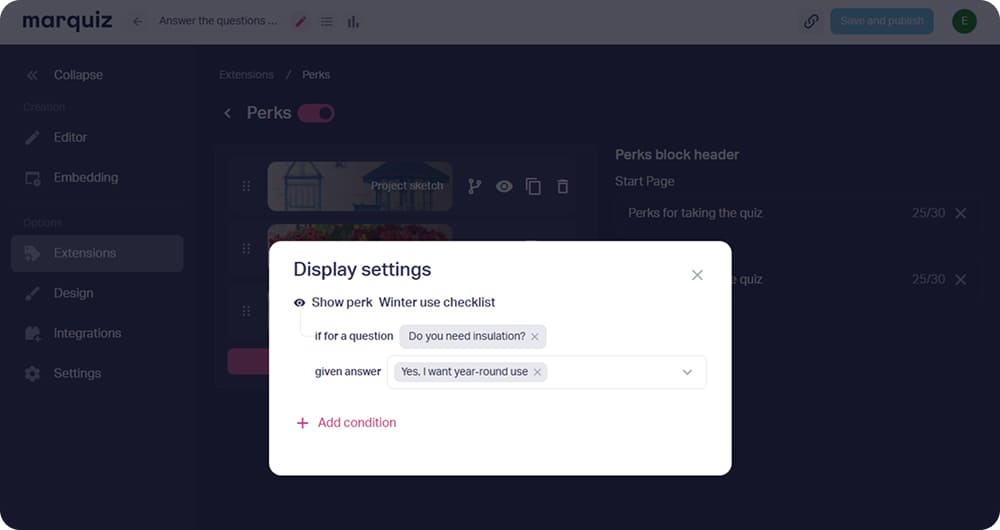
Set a display condition, and the perk goes only to people whose answer it fits
Multiple results. Show each person the result that matches their answers: a recommended product, a price estimate from the built-in calculator, or a plan. You can also send the result and the perks to the person’s email.
A flexible contact form. Collect an email, a phone number, or a messenger contact, and decide whether the form appears before or after the result.
Integrations. Send leads and their answers to your CRM or email marketing tool. Marquiz supports 150+ integrations, including HubSpot and Mailchimp, so each segment can go straight into its own sequence.
Analytics and A/B testing. See how many people start the quiz, where they drop off, and how many leave contacts. Test different headlines, questions, or perks to see which version brings more leads.
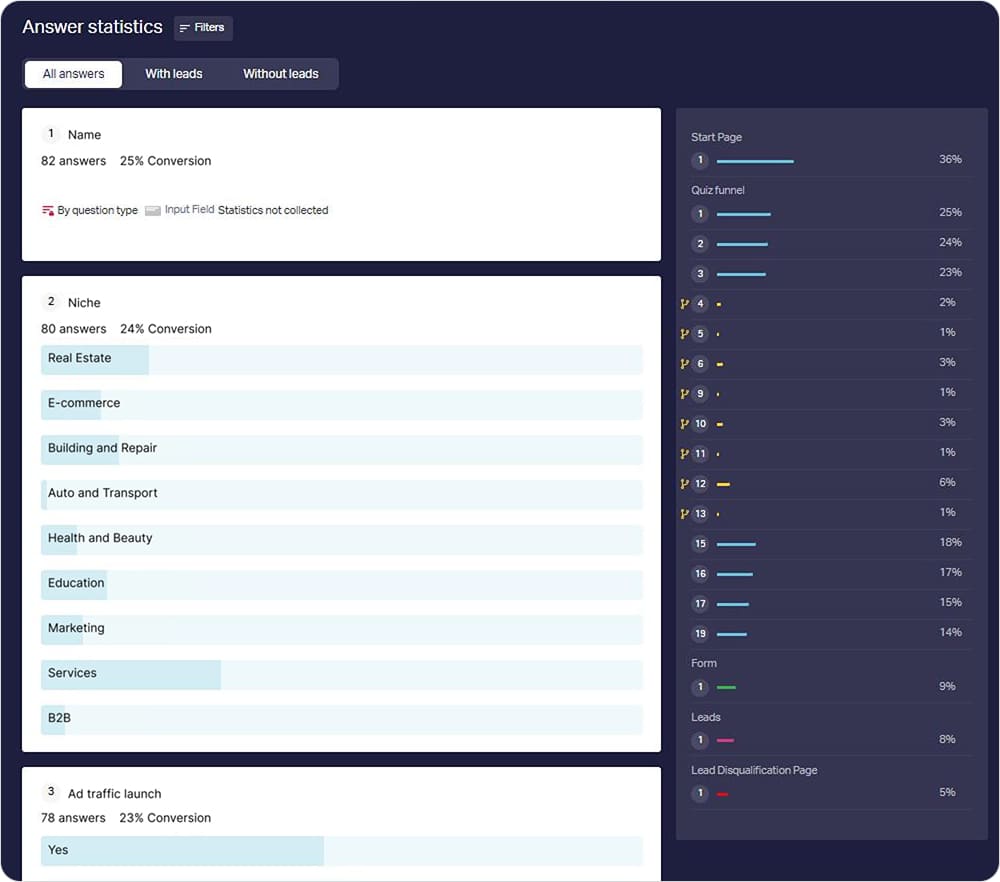
Answer statistics show how people answer each question and how many of them reach the form
Step-by-step instructions are in our knowledge base: Perks in a quiz, Audience segmentation in a quiz, Create quiz results, and How to set up sending results via email.
You can build your first quiz lead magnet on the free plan: it includes 10 leads a month with no time limit, which is enough to test your idea on real traffic. Create your quiz for free and see what your audience tells you.
FAQ

Key takeaways
📌 A quiz lead magnet gives people a personalized result in exchange for their contacts, and gives you the context to follow up.
📌 Design the results before the questions. Every question should affect the result, the segment, or the sales conversation.
📌 Measure the whole funnel, from quiz views to sales. A quiz with fewer leads can still bring more customers.